
As Amazon Associates, we earn from qualifying purchases. This means we may receive a small commission at no extra cost to you if you click through and make a purchase.
Choosing the right desktop hardware from the current catalog of hp all in one printers comes down to balancing monthly sheet capacity, scanning mechanics, and physical footprint. Many remote professionals and households struggle with machines that either overwhelm a small writing desk or crawl through simple paperwork. Deciding which hp printer to buy depends heavily on your daily workflow: casual households printing greeting cards or permission slips require compact footprints, while home businesses generating customer proposals and intake packets demand speed, automatic document feeders, and low intervention intervals.
Understanding how HP structures its consumer and professional hardware provides a clear hp all in one printer comparison. The manufacturer divides its lineup into two distinct families: DeskJet units engineered for light personal tasks, and OfficeJet Pro workhorses built for document production. While the DeskJet models prioritize small footprints and baseline copying, the OfficeJet Pro range introduces enclosed paper cassettes, automatic duplex printing, higher engine speeds, and advanced digital capture features. For shoppers looking across different device types, our guide on hp wireless all-in-one color inkjet printer options details broader categories, but the six models evaluated below represent HP’s specific balance of home convenience and business capability.
HP All-in-One Printers Lineup at a Glance
| Model | Print Speed (Black / Color) | Paper Capacity | Scanner Architecture | Security Platform |
|---|---|---|---|---|
| HP OfficeJet Pro 8125 | Up to 20 ppm / 10 ppm | 225 sheets | Flatbed with single-sided ADF | HP Wolf Essential Security |
| HP DeskJet 2955 | Up to 7.5 ppm / 5.5 ppm | 60 sheets | Flatbed glass only | Basic firmware security |
| HP OfficeJet Pro 9125 | Up to 22 ppm / 18 ppm | 250 sheets | Easy slide-off glass with dual-pass 2-sided ADF | HP Wolf Pro Security |
| HP OfficeJet Pro 9135 | Up to 25 ppm / 20 ppm | 500 sheets (two 250-sheet trays) | Easy slide-off glass with single-pass 2-sided ADF | HP Wolf Pro Security |
| HP OfficeJet Pro 8135 | Up to 20 ppm / 10 ppm | 225 sheets | Flatbed with single-sided ADF | HP Wolf Essential Security |
| HP DeskJet 4355 | Up to 8.5 ppm / 5.5 ppm | 60 sheets | Flatbed with 35-sheet ADF | Basic firmware security |
The Models in Detail
HP OfficeJet Pro 8125 Wireless All-in-One 4.3-INCH TOUCHSCREEN – Quickly navigate your printer with a large color
Check price on Amazon Our score: 9.0/10
Best for: Home workspaces needing integrated fax capabilities
Pros
- Integrated standalone fax hardware
- Automatic two-sided printing
- 225-sheet enclosed tray
- Quiet Mode acoustic reduction
Cons
- Single-sided auto document feeder
- Slower 10 ppm color speed

Best for: High-volume teams needing maximum paper capacity
Pros
- Two 250-sheet paper trays
- Single-pass two-sided scanning
- Fast 25 ppm black speed
- Spacious 4.3-inch touchscreen
Cons
- Heavier 26.1-pound desk footprint

Best for: Busy offices scanning two-sided records
Pros
- Dual-pass two-sided ADF
- Fast 22 ppm black speed
- 250-sheet paper capacity
- HP Wolf Pro Security
Cons
- Heavier 20.5-pound desk footprint
- Dual-pass rather than single-pass scanning
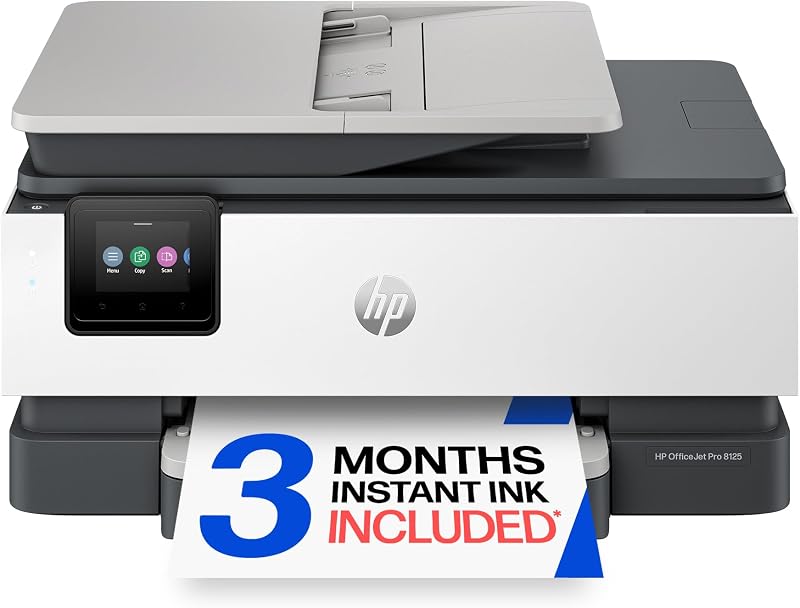
Best for: Standard home office document printing
Pros
- Fast 20 ppm black printing
- Automatic two-sided printing
- 225-sheet enclosed tray
- Responsive 2.7-inch touchscreen
Cons
- Single-sided auto document feeder
- Lacks integrated hardware fax
The HP OfficeJet Pro 8125 Wireless All-in-One functions as a balanced productivity hub designed specifically for remote workstations. It produces black documents at speeds up to 20 pages per minute and color pages up to 10 pages per minute using HP Thermal Inkjet technology. Paper handling is managed through a generous 225-sheet input tray, which keeps fresh paper enclosed and shielded from desk dust. The listing highlights automatic two-sided printing, a 2.7-inch color touchscreen with a phone-like user interface, and Quiet Mode for less disruptive operation during working hours. Documents printed with this unit offer water-resistant, smear-resistant, and fade-resistant qualities, making it a reliable hp printer for home office contracts and business reports.
Digital workflow features include dual-band Wi-Fi that automatically detects and resolves connection problems, alongside HP AI formatting designed to eliminate awkward page breaks and unwanted web elements from emails or online articles. Hardware scanning relies on a flatbed glass surface paired with a single-sided automatic document feeder capable of copying at speeds up to 12 pages per minute in black and white, running up to 99 copies in a single session. Digital security is handled via HP Wolf Essential Security to protect local network endpoints from cyber threats. Construction utilizes more than 45 percent recycled plastic content, and the machine includes a three-month trial of Instant Ink.
This model suits professionals who manage steady weekly document generation and need reliable automatic two-sided printing without consuming excessive desk space. However, because its automatic document feeder processes only one side of an original sheet at a time, users who frequently archive double-sided legal records or tax folders will find better efficiency by stepping up to the dual-pass scanning hardware on the 9125.
HP DeskJet 2955 Wireless All-in-One Color KEY FEATURES – Color print, copy, scan, and a 60-sheet input tray, plus
Check price on Amazon Our score: 9.2/10

Best for: Occasional home printing and tight spaces
Pros
- Lightweight 7.6-pound compact body
- Self-healing dual-band Wi-Fi
- HP AI print formatting
Cons
- Modest 60-sheet paper tray
- No automatic document feeder
Designed strictly for light domestic tasks, the HP DeskJet 2955 Wireless All-in-One Color provides basic multifunction convenience inside a compact, 7.6-pound frame measuring 11.97 inches deep, 16.73 inches wide, and 6.06 inches high. The print mechanism delivers everyday output at up to 7.5 pages per minute in black and 5.5 pages per minute in color, drawing from an open 60-sheet input tray that also accommodates envelopes. Instead of a large graphical screen, navigation relies on an icon LCD control panel that communicates basic status alerts, ink indicators, and copy counts.
Scanning and copying take place solely on the manual flatbed glass, producing black-and-white copies at up to 6 pages per minute with a maximum batch limit of 9 copies per run. Mobile connectivity is supported via the HP App for printing, scanning, or mobile faxing from smartphones, laptops, and desktop computers. Like HP’s larger business hardware, this unit incorporates dual-band Wi-Fi with self-healing connection monitoring, HP AI print formatting to clean up online recipes and emails, and an introductory three-month trial of Instant Ink.
The hp deskjet 2955 serves students, apartment dwellers, and occasional home users who prioritize desktop real estate and only print occasional permission slips, boarding passes, or recipes. It gives way immediately to the DeskJet 4355 if you need an automatic document feeder for multi-page scanning, or to the OfficeJet Pro series if your workload requires automatic two-sided printing or higher paper capacity.
HP OfficeJet Pro 9125 Wireless All-in-One 2.7-INCH TOUCHSCREEN – Quickly navigate your printer with a large color
Check price on Amazon Our score: 7.8/10
The HP OfficeJet Pro 9125 Wireless All-in-One steps into higher-tier administrative duties with an upgraded engine capable of 22 pages per minute in black and 18 pages per minute in color. Built around a 250-sheet input tray, this model expands workflow versatility by incorporating integrated standalone fax hardware alongside print, copy, and scan functions. Navigation is handled through a 2.7-inch color touchscreen, while exterior components utilize more than 40 percent recycled plastic content. Black-and-white copy operations reach up to 21 pages per minute, accommodating batch jobs of up to 99 copies.
Where the hp officejet pro 9125 distinguishes itself from lower-tier units is in document digitizing. Its scanner setup features easy slide-off glass and a dual-pass two-sided automatic document feeder, allowing the machine to capture both sides of multipage records without manual page flipping. Network protection is elevated to HP Wolf Pro Security, providing enterprise-grade shielding for office networks. The unit also includes Smart Advance Scan capabilities, self-healing dual-band Wi-Fi, HP AI document formatting, and a three-month Instant Ink trial.
This hardware is engineered for professional practices, independent consultants, and administrative desks that routinely process two-sided agreements, intake packets, and high-page-count reports. However, if your daily output requires continuous batch printing across multiple paper types without reloading trays, the flagship 9135 represents the logical next step with its dual paper cassette system.
HP OfficeJet Pro 9135 Wireless All-in-One 2.7-INCH TOUCHSCREEN – Quickly navigate your printer with a large color
Check price on Amazon Our score: 8.2/10
At the top of HP’s desktop inkjet line sits the HP OfficeJet Pro 9135 Wireless All-in-One, a robust unit built for demanding small-business environments. It delivers the fastest print speeds in the range, reaching up to 25 pages per minute in black and 20 pages per minute in color. Physical paper management is doubled through two 250-sheet input cassettes, providing a combined 500-sheet paper capacity that allows teams to load an entire ream of paper at once or keep letterhead and standard paper separated simultaneously. The chassis weighs 26.1 pounds and measures 15.6 inches deep by 17.2 inches wide and 12.53 inches high.
Scanning performance on the hp officejet pro 9135 is enhanced with a single-pass two-sided automatic document feeder, capturing both sides of a document simultaneously to cut scanning times significantly compared to dual-pass mechanisms. The scanner utilizes easy slide-off glass, while copy operations process black documents at up to 23 pages per minute. User interaction centers around an expanded 4.3-inch color touchscreen with a phone-like user interface, supplemented by a front USB flash drive port for direct walk-up printing and scanning. Network defense is safeguarded by HP Wolf Pro Security, and the machine includes fax, HP AI formatting, and a three-month Instant Ink trial.
This machine is ideal for busy workgroups, legal desks, and medical clinics that need uninterrupted high-capacity output and rapid double-sided sheet capture. Solitary home workers with lighter monthly volumes, however, will likely find its heavy 26.1-pound frame and dual paper trays unnecessarily bulky for a standard desk.
HP OfficeJet Pro 8135 Wireless All-in-One 2.7-INCH TOUCHSCREEN – Quickly navigate your printer with a large color
Check price on Amazon Our score: 9.4/10
The HP OfficeJet Pro 8135 Wireless All-in-One mirrors the print performance and chassis dimensions of the 8125 while integrating dedicated hardware fax capabilities. It outputs black text at up to 20 pages per minute and color documents at up to 10 pages per minute, supported by a 225-sheet enclosed paper tray and automatic two-sided printing. The printer weighs 17.6 pounds and occupies an 18.12-inch wide footprint. Its prints are water-resistant, smear-resistant, and fade-resistant, maintaining professional legibility across archived client records.
Operation is controlled through a 2.7-inch color touchscreen interface, while internal audio dampening provides a selectable Quiet Mode during calls or concentration periods. As a capable hp wireless all in one printer, it features self-healing dual-band Wi-Fi, HP Wolf Essential Security, and compatibility with the HP App for mobile task execution. The scanning assembly includes a flatbed surface and a single-sided automatic document feeder capable of copying black-and-white sheets at 12 pages per minute up to 99 copies per run. Eco-conscious manufacturing incorporates over 45 percent recycled plastic, backed by a three-month Instant Ink trial.
This model suits home-based businesses, tax preparers, and remote workers who specifically require traditional standalone faxing over an analog phone line alongside robust everyday document production. If your office rarely transmits faxes or handles faxing purely through digital cloud services, the 8125 provides identical print speeds and chassis specifications without the extra fax hardware.
HP DeskJet 4355 Wireless All-in-One Color PRINT SPEED – Up to 8.5 ppm black, 5.5 ppm color
Check price on Amazon Our score: 9.4/10
Best for: Light household use with multipage scanning
Pros
- 35-sheet auto document feeder
- Lightweight 6-pound frame
- Two-year limited warranty
Cons
- Modest 60-sheet paper capacity
- No automatic two-sided printing
Bridging the gap between entry-level compactness and multi-page convenience, the HP DeskJet 4355 Wireless All-in-One Color adds a 35-sheet automatic document feeder to a lightweight home desktop frame. Weighing just 6 pounds with dimensions of 16.85 inches deep, 7.87 inches wide, and 13.07 inches high, the unit is exceptionally easy to place on shared family surfaces or shelf desks. It prints at speeds up to 8.5 pages per minute in black and 5.5 pages per minute in color, utilizing a standard 60-sheet input tray for plain paper feeding.
The integrated 35-sheet document feeder allows users to copy and scan multi-page school assignments or domestic packets without placing each sheet on the flatbed glass manually. The copying subsystem operates at up to 8 pages per minute for black-and-white documents. Device status is monitored via an intuitive icon LCD panel, while connectivity is sustained by dual-band Wi-Fi and mobile controls through the HP App. The listing notes a single processor, a three-month Instant Ink trial, HP AI print formatting, and an extended two-year warranty.
The hp deskjet 4355 is tailor-made for families, educators, and secondary workspaces requiring occasional multipage sheet feeding for homework and bills without occupying significant space. If your daily demands require automatic double-sided printing, enclosed paper trays, or faster print engines, upgrading to the OfficeJet Pro 8125 is necessary.
Matching a Model to Your Setup
- Compact personal desk with light weekly tasks: Choose the DeskJet 2955 for its narrow 6.06-inch profile, simple icon LCD, and low 7.6-pound weight when workspace surface area is minimal.
- Family study room handling multipage school packets: Select the DeskJet 4355 to gain a 35-sheet automatic document feeder for quick scanning while maintaining a lightweight 6-pound footprint.
- Standard home office producing client reports: Deploy the OfficeJet Pro 8125 to leverage 20 ppm black print speeds, automatic two-sided printing, and a 225-sheet enclosed tray.
- Professional practice requiring dedicated phone-line transmission: Opt for the OfficeJet Pro 8135 to retain the 225-sheet tray and Quiet Mode while adding integrated hardware faxing.
- Document-intensive office scanning two-sided contracts: Implement the OfficeJet Pro 9125 to take advantage of dual-pass two-sided ADF scanning, 22 ppm speeds, and HP Wolf Pro Security.
- High-volume administrative team with shared workloads: Install the OfficeJet Pro 9135 for its 500-sheet dual trays, rapid single-pass duplex scanning, 25 ppm engine, and walk-up USB port.
Before You Buy
When comparing specifications across the manufacturer’s product sheets, several operational elements are not stated in the listings and require advance consideration. None of these retail packages explicitly list an included USB cable, meaning users planning a direct physical connection to a desktop PC or laptop must supply their own cord. Furthermore, while all six models include an introductory three-month subscription trial to the Instant Ink delivery service, the listings do not specify the exact page yield of the starter ink cartridges bundled inside the boxes. Shoppers with heavy initial printing needs should plan accordingly before large print runs.
Additionally, the listings omit specific monthly duty cycle figures, recommended monthly page volumes, and exact optical scanner resolution ratings (DPI). While the DeskJet listings mention plain paper and envelopes, they do not specify thick cardstock compatibility or broader media limits. Shoppers who want to contrast inkjet technology against a brother color laser printer all in one can evaluate toner requirements elsewhere, but within HP’s lineup, duty limits and paper weights remain unstated on the retail product pages.
FAQ
What is the main difference between HP DeskJet and OfficeJet Pro printers?
HP DeskJet models are designed for light home use, featuring open 60-sheet paper trays, slower engines between 7.5 and 8.5 pages per minute, and manual or light document feeding. HP OfficeJet Pro printers are built for professional environments, offering enclosed 225- to 500-sheet paper cassettes, speeds up to 25 pages per minute, automatic two-sided printing, color touchscreens, and advanced Wolf Security platforms.
Do all of these HP all-in-one printers support automatic two-sided printing?
No. The OfficeJet Pro models (8125, 8135, 9125, and 9135) include automatic two-sided (duplex) printing as a standard hardware feature. The entry-level DeskJet models (2955 and 4355) do not specify automatic duplex printing in their listings and require manual flipping to print on both sides of a sheet.
How does duplex scanning differ between the OfficeJet Pro 9125 and 9135?
The OfficeJet Pro 9125 uses a dual-pass automatic document feeder, meaning the machine pulls the sheet through the mechanism, scans one side, reverses the paper to scan the second side, and then ejects it. The OfficeJet Pro 9135 uses a single-pass duplex feeder with dual scanning sensors, capturing both sides of the page simultaneously in a single pass for faster processing.
Can I send a fax from an HP printer that does not have built-in fax hardware?
Yes, through mobile software. While models like the OfficeJet Pro 8125 and DeskJet 2955 lack dedicated analog fax modems and telephone jacks, the product listings confirm that the HP App allows users to mobile fax documents directly from a smartphone or computer. Physical phone-line fax hardware is integrated directly into the 8135, 9125, and 9135.
What does HP AI print formatting do on these models?
HP AI formatting is an integrated software feature that analyzes online content, web pages, and emails before printing. It automatically removes unwanted elements such as peripheral advertisements, unnecessary headers, and blank trailing pages, formatting the remaining text and imagery neatly to prevent wasted paper.
How do HP printers all-in-one compare with other desktop brands?
Those comparing peripheral ecosystems against our guide to canon printers all in one wireless will find that HP divides its catalog sharply between casual home convenience and structured office networks. HP focuses heavily on dual-band self-healing Wi-Fi, cloud-managed ink subscriptions, and Wolf Security endpoint protection across its professional tiers.