
As Amazon Associates, we earn from qualifying purchases. This means we may receive a small commission at no extra cost to you if you click through and make a purchase.
Selecting among modern canon printers all in one wireless units requires balancing your weekly print volume against desk space and scanning habits. Home users frequently weigh traditional cartridge setups against refillable reservoirs while evaluating whether their routine demands automated multi-page scanning or simple flatbed copying. When you need a reliable canon printer scanner copier all in one, deciding how often you output documents and whether double-sided sheets are essential will determine which hardware configuration fits your room.
Canon divides its consumer hardware into two distinct mechanical designs: standard cartridge-based PIXMA devices and continuous-flow MegaTank systems. The PIXMA range is split between office-oriented TR units featuring document feeders and creative or entry-level TS models tailored for everyday household assignments. Meanwhile, MegaTank models use integrated reservoirs fed by bottled ink to deliver massive page outputs between refills. While assessing office equipment across broader categories like hp all in one printers, understanding how Canon structures its ink delivery, feed mechanisms, and wireless protocols makes choosing the proper workstation companion straightforward.
Canon Wireless All-in-One Printers Lineup at a Glance
| Model | Core Functionality | Duplex and Feeder | Screen Interface |
|---|---|---|---|
| Canon PIXMA TR4720 | Print, Copy, Scan, Fax | Auto 2-Sided, Auto Document Feeder | Digital readout |
| Canon MegaTank G3270 | Print, Copy, Scan | Single-Sided Only, Flatbed Scanner | 1.35-inch Square LCD |
| Canon PIXMA TS6520 | Print, Copy, Scan | Auto 2-Sided, Flatbed Scanner | 1.42-inch Monochrome OLED |
| Canon Megatank G3290 | Print, Copy, Scan | Auto 2-Sided, Flatbed Scanner | 2.7-inch Color Touchscreen |
| Canon PIXMA TR7820 | Print, Copy, Scan | Auto 2-Sided, Auto Document Feeder | 2.7-inch Color Touchscreen |
| Canon PIXMA TS3720 | Print, Copy, Scan | Single-Sided Only, Flatbed Scanner | 1.5-inch Segment LCD |
The Models in Detail
Canon PIXMA TR4720 All-in-One Wireless Printer Wireless 4-in-1 (print | copy | scan | fax)..Power Consumption
Check price on Amazon Our score: 7.8/10

Best for: Home offices needing fax and document feeding
Pros
- Auto document feeder included
- Automatic two-sided printing
- Integrated fax capabilities
Cons
- Color speed limited to 4.4 ipm
- Listing specifies plain paper only
The Canon PIXMA TR4720 All-in-One Wireless Printer is built as a complete home-office workstation, offering print, copy, scan, and standalone fax capabilities. Operating at a modest power draw of 7W during active use and 0.8W on standby, it integrates an automatic document feeder above its flatbed glass alongside automatic two-sided printing. The listing specifies simplex document print speeds up to approximately 8.8 images per minute in black and 4.4 images per minute in color, while borderless 4-by-6-inch photo prints process in around 65 seconds. A 100-sheet paper tray handles standard plain sheets up to 8.5 by 11 inches, and the unit can manage copy runs up to 99 pages at 8.8 pages per minute.
Designed for easy cartridge installation and replacement, this 12.7-pound machine connects via wireless networks and supports mobile printing through Canon companion apps on smartphones. Its physical footprint measures 11.7 inches deep, 17.2 inches wide, and 7.5 inches high, featuring Android controller compatibility and Energy Star certification. A limited warranty provides one year of hardware coverage with one year of spare part availability in European Union regions, giving users basic reassurance for daily office assignments.
This model suits remote workers, freelance professionals, and home offices that regularly process multi-page contracts, legal packets, or outbound faxes without needing manual sheet-flipping. However, because its paper handling is restricted in the listing strictly to plain paper, users intending to produce heavy cardstock projects or high-resolution photo albums will find better media support by transitioning to Canon creative-series hardware.
Canon MegaTank G3270 All-in-One Wireless Color Up to 2 years of ink included (2)
Check price on Amazon Our score: 8.2/10
Best for: High-volume color printing on various media
Pros
- Up to 2 years ink included
- Yields up to 6,000 black pages
- Handles card stock and glossy media
Cons
- Single-sided printing only
- Small 1.35-inch display screen
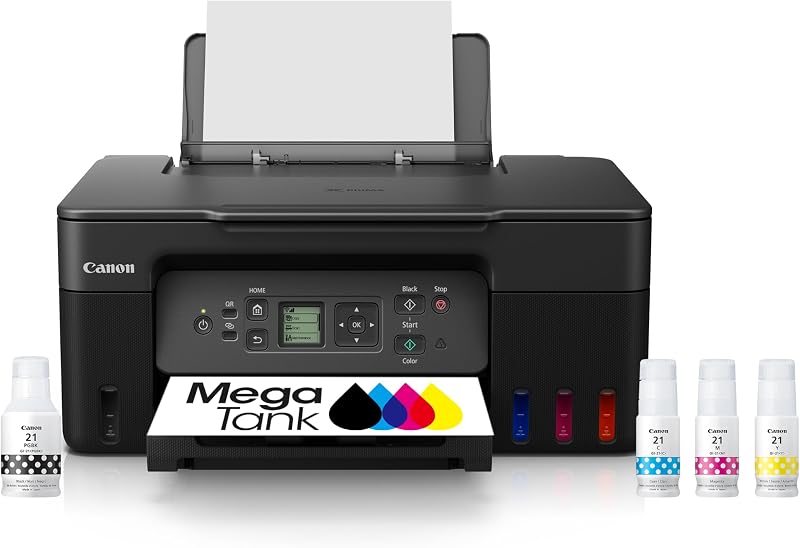
Engineered for high-volume text and image production, the Canon MegaTank G3270 All-in-One Wireless Color replaces traditional cartridges with large refillable internal ink reservoirs. According to the manufacturer data, it includes up to two years of ink in the box, delivering an estimated yield of up to 6,000 black-and-white pages or 7,700 color pages from a single set of bottles. The machine functions as a three-in-one wireless print, copy, and scan station with a black-and-white copy speed rated at 11 pages per minute over its flatbed scanner. Navigation is handled through an integrated 1.35-inch square LCD panel mounted on the chassis.
Physical media flexibility is a strong asset of this 13.2-pound machine, with listing specifications noting native handling for plain paper, card stock, envelopes, glossy photo paper, and high-resolution paper. The unit measures 21.9 inches deep, 16.4 inches wide, and 10.6 inches high, operating with iOS controller compatibility, network-ready wireless connectivity, and an Energy Star and EPEAT Qualified rating. The listing does not specify dual-band Wi-Fi channels, but it details a limited warranty backed by a 5-year EU spare part availability duration.
The G3270 suits home educators, craft enthusiasts, and small independent studios printing frequent colorful diagrams, worksheets, or specialty stock. Because it is limited strictly to single-sided printing and lacks an automatic feeder, shoppers who routinely produce double-sided multipage business reports will achieve higher efficiency with duplex-capable models like the G3290 or TR7820.
Canon PIXMA TS6520 Wireless Color Inkjet Crisp, Vibrant Prints – Experience impressive print quality for both
Check price on Amazon Our score: 8.2/10

Best for: Everyday home workspaces wanting duplex printing
Pros
- Automatic two-sided printing
- Dual-band wireless connectivity
- Clear 1.42-inch monochrome OLED
Cons
- Lacks auto document feeder
- Listing specifies plain paper only
The Canon PIXMA TS6520 Wireless Color Inkjet delivers a clean desktop profile designed for balanced everyday home operations. This three-in-one printer, copier, and flatbed scanner uses a two-cartridge hybrid ink system that pairs pigment black ink for sharp text with dye color for vibrant graphic output. It features automatic two-sided printing to cut down on media waste and incorporates a 1.42-inch monochrome OLED display for monitoring ink levels and network status. Connectivity includes dual-band Wi-Fi operating on 2.4GHz or 5GHz bands alongside Amazon Alexa controller support.
Weighing 15.4 pounds and measuring 14.8 inches deep, 14 inches wide, and 6.7 inches high, the TS6520 delivers a compact white chassis suited for tight shelving or shared family credenzas. The listing notes borderless print capabilities up to 8.5 by 11 inches, an 11 page-per-minute black copy speed, and compatibility with laptops, desktop personal computers, smartphones, and tablets. Maintenance and parts are supported under a limited warranty with one year of EU spare part availability.
Families, secondary students, and hybrid telecommuters needing dependable homework generation, recipe output, and clean photo reproductions will appreciate the straightforward maintenance of this device. Because the listing notes only plain paper support and confirms the absence of an auto document feeder, users managing heavy document archives or multi-sheet receipts should consider stepping up to the TR series.
Canon Megatank G3290 All-in-One Wireless Printer Up to 2 years of ink included
Check price on Amazon Our score: 8.0/10

Best for: Busy offices requiring high yield duplexing
Pros
- Up to 2 years ink included
- Automatic two-sided printing
- Intuitive 2.7-inch color touchscreen
Cons
- Requires manual flatbed scanning
- Wider desktop profile
Combining the economics of bottled ink with productivity features, the Canon Megatank G3290 All-in-One Wireless Printer upgrades the SuperTank concept for busier office routines. Like its sister tank models, it includes up to two years of ink in the package, yielding up to 6,000 black pages or 7,700 color pages from a full bottle set. Crucially, the G3290 introduces automatic two-sided printing, allowing households to halve their paper consumption during long document jobs. Device management is centered around a responsive 2.7-inch color LCD touchscreen.
The hardware measures 14.3 inches deep, 16.4 inches wide, and 7 inches high, carrying a total weight of 14.2 pounds. The listing specifies wide media capabilities including card stock, envelopes, labels, glossy photo paper, high-resolution paper, and standard plain sheets. Additional features highlighted in the data include Auto Power On, borderless photo printing, an 11 page-per-minute black copy speed, iOS device control, and smartphone compatibility backed by a one-year EU spare part availability period.
This model is optimal for active remote offices, graduate students, and small enterprises that require voluminous output without manually flipping sheets or running through cartridge replacements every few weeks. If your workflow involves feeding stacks of multi-page invoices into a scanner, however, you will need a unit equipped with a motorized feeder like the TR7820, as the G3290 relies on a manual flatbed.
Canon PIXMA TR7820 Print, Copy, Scan features for full control at your fingertips
Check price on Amazon Our score: 8.2/10
Best for: Fast productivity with automated document handling
Pros
- Fast 15 ipm black print speeds
- Auto document feeder and duplexing
- Large 2.7-inch color touchscreen
Cons
- Heaviest model at 16 pounds
- Uses two-cartridge ink system
The Canon PIXMA TR7820 represents the high-speed tier of Canon home office inkjets, posting listing speeds of approximately 15 images per minute in black and 10 images per minute in color. Built with an integrated automatic document feeder and automatic duplexing, it allows users to scan, copy, and print double-sided multipage stacks without physical intervention. Copying speeds match print velocity at 15 black pages per minute, with multi-copy runs supporting up to 99 duplicates. Configuration is managed directly from a 2.7-inch color LCD touchscreen.
The unit weighs 16 pounds with external dimensions of 13.8 inches deep, 14.8 inches wide, and 8.2 inches high, making it the most substantial PIXMA model in this selection. It utilizes a two-cartridge hybrid ink system that combines pigment black for crisp text rendering with dye-based colors for photo vibrancy. The listing details media compatibility for envelopes, glossy photo paper, high-resolution paper, and plain paper, as well as creative integration with PosterArtist Online.
This printer is engineered for professionals handling client proposals, legal packets, and rapid scanning workflows where processing speed is paramount. Because it uses traditional two-cartridge consumable sets rather than bottled reservoirs, individuals outputting reams of pages every week may find the per-page yield of a MegaTank model more aligned with their maintenance preferences.
Canon PIXMA TS3720 Wireless All-in-One Printer Print, Copy, Scan features for full control at your fingertips
Check price on Amazon Our score: 8.4/10
Best for: Occasional home printing and mobile tasks
Pros
- Lightweight 8.7-pound compact build
- Dual-band wireless connectivity
- Explicit Chromebook support
Cons
- Single-sided printing only
- Modest 4 ipm color speed
As the most portable option in the range, the Canon PIXMA TS3720 Wireless All-in-One Printer offers basic three-in-one wireless capabilities across an 8.7-pound chassis. Designed for straightforward setup without requiring a desktop computer, it features dual-band Wi-Fi on both 2.4GHz and 5GHz frequencies alongside direct printing through the Canon PRINT app, Apple AirPrint, Mopria Print Service, and Chromebooks. A simple 1.5-inch segment LCD screen handles status monitoring, while print speeds register at approximately 7.7 images per minute for black documents and 4 images per minute for color.
The TS3720 measures 17.2 inches deep, 12.9 inches wide, and 5.8 inches high, maintaining a low vertical profile for cramped bookshelves. It relies on a two-cartridge hybrid system with pigment black and dye colors, supporting borderless prints, envelopes, labels, plain paper, and high-resolution media. Like the TR7820, it integrates with Canon PosterArtist Online software for signage and banner creation. European Union spare part availability is listed at one year alongside a limited manufacturer warranty.
This compact model is ideal for dorm rooms, seasonal dwellings, or low-frequency households needing an occasional boarding pass, permission slip, or return label. Users seeking automated two-sided printing or higher print speeds will quickly outgrow its single-sided engine and should look toward the TS6520 or TR4720 instead.
Matching a Model to Your Setup
- Dedicated home office processing contracts and multi-page forms: The Canon PIXMA TR4720 All-in-One Wireless Printer delivers both an automatic document feeder and built-in fax capabilities to manage formal business documentation smoothly.
- Busy remote workspace needing high page volume with duplexing: The Canon Megatank G3290 All-in-One Wireless Printer combines large refillable ink bottles yielding thousands of pages with automatic two-sided printing to keep workflow productivity uninterrupted.
- Speed-focused home tasks requiring heavy scanning: The Canon PIXMA TR7820 provides top-tier 15 ipm black speeds, a responsive 2.7-inch color touchscreen, and an automated feeder for rapid document reproduction.
- Crafting spaces and high-capacity visual projects: The Canon MegaTank G3270 All-in-One Wireless Color accommodates diverse stock including card stock and glossy paper with abundant bottled ink reserves right out of the box.
- Balanced family desk or secondary school workspace: The Canon PIXMA TS6520 Wireless Color Inkjet offers dual-band wireless, duplexing, and an intuitive OLED readout without overwhelming compact furniture.
- Dorm living or light occasional household output: The Canon PIXMA TS3720 Wireless All-in-One Printer offers an 8.7-pound lightweight design, Chromebook compatibility, and simple smartphone printing for basic tasks.
Before You Buy
Before purchasing your next wireless printing hub, take time to check what the listings omit regarding physical cables and packaging contents. None of the six product listings specify the inclusion of a USB computer interface cable, meaning you must have an existing cable or depend entirely on local wireless connectivity for initial setup. While the two MegaTank models specifically confirm that full sets of bottled ink providing up to two years of printing are included in the carton, the PIXMA listings confirm the presence of starter cartridges but do not detail their exact initial milliliter capacity or page longevity.
Additionally, mechanical specifications vary widely regarding tray handling and wireless operating environments across the range. While the TR4720 explicitly states a 100-sheet paper capacity, the remaining product listings do not specify their maximum input tray sheet limits. Furthermore, while the TS6520 and TS3720 explicitly advertise dual-band Wi-Fi operating on 2.4GHz and 5GHz channels, the listings for the G3270, G3290, TR7820, and TR4720 do not specify their specific Wi-Fi frequency band compatibility. When planning workstation layouts or cross-shopping broader office collections like brother printers all in one wireless, verifying these physical dimensions and home router parameters prevents unexpected connectivity roadblocks.
FAQ
What is the primary difference in the megatank vs pixma comparison?
The essential distinction lies in ink delivery and capacity. Standard PIXMA printers utilize traditional two-cartridge systems containing internal print heads and sponge reservoirs that are replaced once depleted. MegaTank models feature built-in clear fluid tanks filled from bottles, supplying up to 6,000 black or 7,700 color pages per set to handle substantial workloads without frequent cartridge changes.
Which models support automatic two-sided printing?
Among the six units, the Canon PIXMA TR4720, Canon PIXMA TS6520, Canon Megatank G3290, and Canon PIXMA TR7820 feature automatic two-sided duplex printing. The Canon MegaTank G3270 and Canon PIXMA TS3720 are restricted by their listings strictly to single-sided printing operations.
Which Canon printer has an automatic document feeder for multi-page scanning?
The Canon PIXMA TR4720 and the Canon PIXMA TR7820 are the only two models among these options equipped with an integrated auto document feeder. The other four units—the G3270, TS6520, G3290, and TS3720—rely exclusively on flatbed glass scanners, requiring you to place and rotate each page manually.
Which canon all in one wireless printer includes standalone faxing capability?
Only the Canon PIXMA TR4720 listing specifies built-in fax hardware alongside its printing, copying, and scanning functions. None of the other five models mention fax communication support in their specifications, operating strictly as three-in-one print, copy, and scan machines.
Can I print directly from a Chromebook on these printers?
The listing for the Canon PIXMA TS3720 explicitly confirms native Chromebook printing support alongside mobile services like Apple AirPrint and Mopria. The other product listings do not specify explicit Chromebook compatibility, though they list general personal computer, iOS, or Android smartphone support.
How do I determine which canon printer to buy for mixed photo and craft printing?
Look carefully at the media support listed in each product’s technical specifications. The Canon MegaTank G3270, Canon Megatank G3290, and Canon PIXMA TR7820 explicitly list compatibility with card stock, high-resolution paper, and glossy photo paper. By contrast, the listings for the TR4720 and TS6520 specify plain paper handling, making the G-series or TR7820 far better suited for card making and specialty media.