
As Amazon Associates, we earn from qualifying purchases. This means we may receive a small commission at no extra cost to you if you click through and make a purchase.
Choosing a canon large format printer requires looking closely at how your workspace balances technical drafting, creative artwork, and daily document output. While conventional desktop machines handle standard letter sheets, wide-format hardware introduces roll feeders, specialized multi-channel pigment systems, and media handling designed for architectural blueprints, gallery photos, and oversized display posters. Deciding which canon large format printer to buy depends directly on whether your routine demands continuous roll feeding for floor plans, high-density pigment ink for exhibition prints, or a compact sheet feeder that fits alongside an existing desk setup without monopolizing office floor space.
The Canon wide-format lineup divides into two primary branches: dedicated 24-inch imagePROGRAF roll printers engineered for architectural drafting, line work, and posters, alongside desktop-oriented imagePROGRAF and PIXMA units handling widths from 13 to 17 inches for graphic arts and photography. Within these branches, Canon distinguishes machines by ink chemistry and media paths. Technical plotters utilize high-speed pigment sets formulated to resist job-site moisture, fine-art models incorporate up to eleven pigment inks with gloss optimizers for exhibition tonal range, and desktop PIXMA units rely on dye-based formulations for rapid, saturated photo proofs. A comprehensive canon wide format printer comparison reveals that aligning the chassis dimensions and ink configuration with your daily volume prevents both wasted footprint and mismatched print durability.
Canon Large Format Printers Lineup at a Glance
| Model | Print Width | Ink System | Primary Application |
|---|---|---|---|
| Canon imagePROGRAF TC-21M | Up to 24 inches | 4-color ink (BK, C, M, Y) | CAD drafting, poster enlargements, educational banners |
| Canon imagePROGRAF TM-240 24″ Large Format | Up to 24 inches | 5-color water-resistant pigment ink | High-speed technical plans, construction plots, outdoor signage |
| Canon imagePROGRAF PRO-310 Professional 13″ Wireless | Up to 13 inches | 9-color LUCIA PRO II pigment + Chroma Optimizer | Gallery fine art, exhibition photography, matte art media |
| Canon PIXMA PRO-200S Professional 13″ Wireless | Up to 13 inches | 8-color dye-based ink | Vibrant graphic design, portfolio proofs, glossy photo prints |
| Canon imagePROGRAF PRO-1100 | Up to 17 inches | 11-color LUCIA PRO II pigment + Chroma Optimizer | Professional wide-gamut photography, studio art production |
| Canon Pixma iX6820 Wireless Business Printer | Up to 13 inches | 5-color individual ink tanks | Office spreadsheets, presentation diagrams, marketing mailers |
The Models in Detail
Canon imagePROGRAF TC-21M ENLARGE COPY – Make enlargements of smaller originals directly from a letter
Check price on Amazon 4.5 out of 5 — average from Amazon buyers

The Canon imagePROGRAF TC-21M serves as a compact 24-inch multifunction device designed for environments where drafting, classroom visual aids, and general administrative work overlap. Built with physical dimensions of 21 inches deep, 38 inches wide, and 10 inches high, this model manages roll media up to 24 inches wide while incorporating an integrated auto sheet feeder that holds up to 100 sheets of letter paper or 50 sheets of 11-by-17-inch media. Its standout hardware component is an integrated letter-sized flatbed scanner that enables users to execute direct enlargements of smaller hard-copy originals up to 24 inches wide without requiring an attached computer or workstation software.
Operation is managed through a tiltable 2.7-inch color touchscreen LCD, paired with a direct USB flash drive port and built-in cloud printing and scanning capabilities. The four-color inkjet engine utilizes black, cyan, magenta, and yellow inks, delivering a print resolution of up to 2400 by 1200 dpi. For small architectural firms, trade contractors, schools, and home offices seeking a multipurpose workflow, it functions as an all-in-one hub capable of monochrome copying at up to 16 pages per minute alongside large-format plot production. If your daily tasks mirror those of a standard office workstation, you might also compare these capabilities against a traditional canon printer scanner copier all in one system.
This model suits educational staff, field contractors, and independent draftsmen who need quick plan reproductions and banner output from paper originals. However, because it relies on a four-color ink system and letter flatbed platen, users seeking high-volume production CAD line work or archival fine-art gallery output will find the imagePROGRAF TC-21M gives way to dedicated technical plotters like the TM-240 or fine-art pigment printers.
Canon imagePROGRAF TM-240 24″ Large Format With the new L-COA PRO II processor, the imagePROGRAF TM Series is
Check price on Amazon 4.8 out of 5 — average from Amazon buyers

The Canon imagePROGRAF TM-240 24″ Large Format is engineered specifically for rigorous drafting, engineering, and commercial poster workloads where output speed and line precision are critical. Driven by the L-COA PRO II image processor, the canon imageprograf tm-240 operates approximately 30 percent faster than previous series models, producing a 24-by-36-inch architectural sheet in up to 3.2 pages per minute. The printer utilizes a high-density six-channel PF-06 printhead featuring 15,360 nozzles that dispense precise five-picoliter ink droplets, ensuring that fine line drawings, structural notations, and dense CAD hatching maintain sharp legibility at a 2400 by 1200 dpi maximum resolution.
Ink delivery relies on a five-color formulation that incorporates a newly formulated magenta cartridge alongside UV- and water-resistant inks. When paired with water-resistant media, this ink set creates prints capable of surviving demanding job-site environments and temporary outdoor display. The physical chassis measures 29.4 inches deep, 38.5 inches wide, and 17.2 inches high, with an operational weight of 88.2 pounds. The printer features built-in color calibration tools to guarantee chromatic consistency across multiple TM-series devices over extended production cycles, alongside automated media detection that identifies the type, length, and width of loaded stock and displays the details on the primary interface screen.
This true canon 24 inch plotter is built for architectural, engineering, and construction offices that require fast, durable technical prints and high-volume posters. While it incorporates basic scan capabilities according to the manufacturer specifications, it gives way to the imagePROGRAF PRO-310 or PRO-1100 when an office needs deep fine-art gradations, wide-gamut photo reproduction, or specialized museum-grade media support.
Canon imagePROGRAF PRO-310 Professional 13″ Wireless EASE OF USE — ultimate productivity with Anti-Clogging System and Skew
Check price on Amazon 4.1 out of 5 — average from Amazon buyers
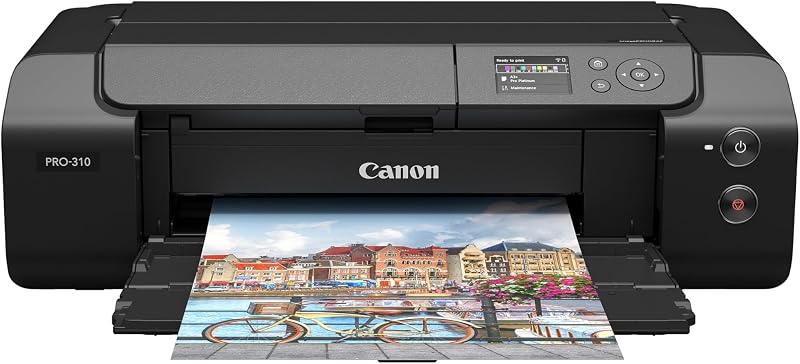
The Canon imagePROGRAF PRO-310 Professional 13″ Wireless is a specialized photo and fine-art inkjet printer developed for creative professionals who produce archival-grade exhibition prints up to 13 inches wide. Central to the performance of the canon imageprograf pro-310 is the LUCIA PRO II pigment-based ink system, which utilizes nine individual color channels combined with a Chroma Optimizer cartridge. This configuration ensures uniform gloss across reflective papers, reduces bronzing effects, and provides scratch resistance across varied art papers. A dedicated Matte Black ink formulation broadens dark-area reproduction ranges, delivering deep black density on cotton rag and velvet fine-art media.
The unit measures 28.7 inches deep, 18.6 inches wide, and 14.04 inches high, weighing 31.6 pounds. A 3.0-inch color LCD monitor mounted on the front chassis allows photographers to check consumable levels, review media paths, and inspect machine status without opening computer utility panels. The paper handling mechanism incorporates active skew correction and a dedicated anti-clogging ink monitoring system, which work together to safeguard expensive fine-art sheets from alignment errors and banding artifacts during delicate print runs.
This printer is best suited for serious photographers, digital illustrators, and boutique art studios seeking uncompromising archival longevity and monochrome tonality. It serves as a dedicated single-function output engine, meaning it lacks scanning or copying capabilities. Users whose priority centers on high-turnaround proofing on glossy stock may find the dye-based PIXMA PRO-200S a more rapid alternative, while those needing display prints beyond 13 inches must step up to the 17-inch PRO-1100.
Canon PIXMA PRO-200S Professional 13″ Wireless 8 COLOR dye-based ink system produces vibrant, high quality prints
Check price on Amazon 4.2 out of 5 — average from Amazon buyers

The Canon PIXMA PRO-200S Professional 13″ Wireless focuses on high-speed visual reproduction, vibrant color saturation, and flexible sheet-fed media support up to 13 by 19 inches. Unlike pigment-based systems, the canon pixma pro-200s utilizes an eight-color dye-based ink system containing cyan, magenta, yellow, and black tanks alongside dedicated intermediate shades. This dye formulation sinks deeply into glossy, luster, and semi-gloss paper coatings, achieving rich tonal transitions and high gloss uniformity without the bronzing sometimes encountered with pigment dots. The unit delivers a maximum resolution of 4800 by 2400 dpi and supports borderless printing across formats ranging from 3.5 by 3.5 inches up to full 13-by-19-inch A3+ display sheets.
Engineered for swift studio proofing, the PRO-200S produces a bordered A3+ print in approximately 90 seconds and an 8-by-10-inch photo in roughly 53 seconds. The physical chassis weighs 32 pounds and shares the 28.7-inch depth, 18.6-inch width, and 14.04-inch height footprint of its professional sibling, incorporating a 3.0-inch color LCD screen for straightforward paper configuration and supply tracking. Dual input trays allow users to separate thick art media from standard photo papers, preventing feeding complications during diverse output sessions. For general office workspaces that balance high-end photo prints with regular correspondence, reviewing standard canon printers all in one wireless helps establish whether a dedicated photo machine or general-purpose office hardware fits daily volume better.
Creative agencies, design students, and commercial portrait photographers will appreciate this model for quick client hand-offs and punchy portfolio displays. It gives way to the imagePROGRAF PRO-310 or PRO-1100 when clients require archival pigment longevity for museum collection sales or deep matte black density on unvarnished watercolor papers.
Canon imagePROGRAF PRO-1100 Via a FINE print head that controls precise ink ejection
Check price on Amazon 4.8 out of 5 — average from Amazon buyers
The Canon imagePROGRAF PRO-1100 represents the premier desktop tier in Canon wide-format photo reproduction, accommodating cut sheets up to 17 inches wide for true gallery-scale presentation. At the core of the canon imageprograf pro-1100 is an eleven-color LUCIA PRO II pigment ink system complemented by Chroma Optimizer. Operating with Canon PFI-4100 ink tanks holding 80 mL each, this system yields substantial capacity for extensive print runs while delivering enhanced dark area clarity, broad color gamut expansion, and scratch-resistant surfaces across fine-art and glossy media alike.
To ensure total precision during paper transport, the PRO-1100 integrates an air feeding system that uses a vacuum mechanism to keep heavy art sheets flat against the platen, preventing media skewing and ensuring precise ink droplet placement. A specialized FINE printhead features anti-clogging sensor control to eliminate misfires during long printing cycles. The physical unit weighs 83 pounds and is supported by professional management software, including Canon Professional Print & Layout, Media Configuration, Color Calibration, and Accounting Manager tools that monitor individual project costs and ensure device consistency.
This 17-inch powerhouse is built for professional printmakers, exhibition photographers, and commercial art labs where broad print dimensions and gallery-grade ink longevity are mandatory. Due to its substantial 83-pound build, single-page-per-minute throughput speed, and dedicated print-only nature, it gives way to the compact PIXMA iX6820 or TC-21M for users whose primary output involves office reports, CAD drafting, or basic charts.
Canon Pixma iX6820 Wireless Business Printer High performance 5 individual ink tank system
Check price on Amazon 4.9 out of 5 — average from Amazon buyers
The Canon Pixma iX6820 Wireless Business Printer provides an accessible, space-efficient method for introducing wide-format output into home offices and administrative environments. Measuring 12.3 inches deep, 23 inches wide, and 6.3 inches high with a total weight of 17.9 pounds, the canon pixma ix6820 wide format machine occupies a fraction of the desk area required by technical roll plotters. Despite its modest size, it handles sheet media from 4-by-6-inch cards up to 11-by-17-inch ledger sheets and 13-by-19-inch presentation charts, supported by a 150-sheet auto sheet feeder that simplifies continuous office printing.
The print engine uses a five-color individual ink tank system combining dye-based colors for graphs and images with a pigment-based black for crisp text. Its FINE printhead technology incorporates 5,120 total nozzles (4,096 color and 1,024 black) that deliver an impressive 9600 by 2400 maximum color dpi resolution. Connectivity includes wireless options such as AirPrint, Google Cloud Print, and PIXMA Printing Solutions, alongside access to downloadable Solution Templates that assist administrative teams in formatting marketing flyers and large spreadsheets. Maintaining a clean desktop environment free of airborne debris helps preserve delicate feeder rollers on wide desktop printers, an area where running an eco self air purifier provides practical workspace value.
This compact business unit suits remote project managers, accountants, marketing teams, and small real estate brokerages needing oversized spreadsheets and visual project schedules without heavy mechanical overhead. It gives way to the imagePROGRAF TC-21M and TM-240 when continuous roll media or large 24-inch architectural schematics are necessary, and yields to the PRO-310 when gallery-grade pigment photo output is required.
Matching a Model to Your Setup
- Field Offices and Classroom Training: Choose the Canon imagePROGRAF TC-21M if your team needs to enlarge standard 8.5-by-11-inch documents up to 24-inch banners and plans using a standalone flatbed scanner without turning on a computer.
- High-Volume Architectural and Engineering Firms: Select the Canon imagePROGRAF TM-240 24″ Large Format when rapid production of moisture-resistant 24-by-36-inch CAD plots and job-site drawings takes precedence over desk space.
- Exhibition Photographers and Fine Artists: Choose the Canon imagePROGRAF PRO-310 Professional 13″ Wireless for archival pigment output on heavy fine-art rag papers with dedicated Matte Black density.
- Graphic Designers and Portrait Studios: Opt for the Canon PIXMA PRO-200S Professional 13″ Wireless if your primary workflow involves fast, highly saturated proof prints and glossy portfolio images up to 13 by 19 inches.
- Commercial Art Studios and Gallery Printmakers: Invest in the Canon imagePROGRAF PRO-1100 to produce large-scale 17-inch exhibition prints using an eleven-color pigment system and vacuum air feeding.
- Standard Administrative and Home Workspaces: Select the Canon Pixma iX6820 Wireless Business Printer to produce oversized 11-by-17-inch spreadsheets and 13-by-19-inch visual presentations directly from a standard desktop surface.
Before You Buy
Reviewing the physical listings for these Canon wide-format printers reveals several important accessory omissions that shoppers should anticipate before delivery. The product descriptions for the 24-inch roll models do not specify whether an external floor stand, paper catch basket, or starter paper rolls are bundled in the primary box, or whether they must be acquired as separate optional accessories. In addition, the retail listings across both photo and technical lines do not specify whether high-speed USB host cables or Ethernet wiring are included in the packaging, meaning buyers should verify interface supplies prior to installation.
Cartridge documentation and software compatibility also present variables that require careful attention. While ink tank capacities are explicitly provided for the PRO-1100 (80 mL) and initial bundle volume is noted for the TM-240 (300 mL), the listings do not specify expected page yield figures or milliliter volumes for the starter cartridges on the TC-21M, PRO-200S, PRO-310, or iX6820. Furthermore, legacy specifications on the iX6820 reference older computer operating systems like Windows 7 and OS X v10.9 without detailing current update patches, and minimum workstation RAM requirements are not detailed across the product specifications.
FAQ
Can a Canon large format printer handle both roll paper and cut sheets?
Certain models in the Canon wide-format range support both formats, while others are strictly sheet-fed devices. The 24-inch imagePROGRAF TC-21M and TM-240 accept continuous paper rolls alongside sheet feeds, with the TC-21M featuring an auto sheet feeder for up to 100 letter sheets or 50 11-by-17-inch pages. Conversely, photo-oriented models such as the PRO-310, PRO-200S, PRO-1100, and iX6820 are designed primarily as cut-sheet printers using rear trays and specialized manual feeding slots for heavy art stock.
What is the difference between dye and pigment ink in wide-format printing?
Dye-based inks, such as the eight-color set in the PIXMA PRO-200S, utilize fully dissolved colorants that soak into paper coatings to produce vibrant tones, rapid dry times, and uniform gloss on reflective papers. Pigment-based inks, featured in the TM-240, PRO-310, and PRO-1100, use microscopic solid particles suspended in liquid. Pigment formulations offer superior UV fade resistance, enhanced water resistance on outdoor job sites, and greater archival permanence on fine-art rag media.
How much desk space does a 24 inch plotter require?
A 24-inch plotter requires significantly more physical space than an office desktop printer. The Canon imagePROGRAF TC-21M measures 38 inches wide, 21 inches deep, and 10 inches high, making it suitable for a deep workbench or dedicated wide credenza. The TM-240 expands further, measuring 38.5 inches wide, 29.4 inches deep, and 17.2 inches high with an operational weight of 88.2 pounds, which generally necessitates a heavy-duty equipment stand with clearance for paper roll loading and front sheet ejection.
Do these wide-format printers support wireless printing from mobile devices?
Yes, all six models feature wireless connectivity solutions, though implementation varies by model tier. The technical and professional photo units, including the TC-21M, PRO-310, PRO-200S, and PRO-1100, offer onboard Wi-Fi alongside cloud connectivity functions. The compact Pixma iX6820 includes AirPrint and mobile app compatibility, allowing users to send oversized spreadsheets, diagrams, and photo proofs directly from smartphones, tablets, and laptops without tethering a physical cable.
What is the role of Chroma Optimizer in Canon photo printers?
Chroma Optimizer is a specialized clear coating ink channel found on professional pigment printers such as the imagePROGRAF PRO-310 and PRO-1100. When printing on glossy or semi-gloss media, pigment droplets can create uneven surface textures that cause light scattering, known as bronzing. The Chroma Optimizer cartridge coats the printed image to flatten the surface, providing consistent gloss reflection, enhancing black density, and expanding perceived color gamut across exhibition-grade prints.