
As Amazon Associates, we earn from qualifying purchases. This means we may receive a small commission at no extra cost to you if you click through and make a purchase.
Establishing a dependable internet link between separate structures on your property often presents a major logistical challenge. Digging trenches through established landscaping, breaking through concrete pathways, or laying conduit across yards to run physical network cabling demands extensive labor, permits, and physical disruption. A ubiquiti point to point wireless bridge outdoor deployment bypasses the shovel entirely by projecting an invisible, high-capacity data conduit through the open air. Whether you need to supply reliable internet to a detached workshop, set up a home office inside a converted garage, or monitor outbuildings with network cameras, an outdoor wifi bridge connects separate locations with minimal physical invasiveness.
Ubiquiti designs wireless bridging equipment across multiple product tiers, catering to diverse network architectures, operational ranges, and technical requirements. The brand’s lineup divides primarily between long-standing airMAX frequency hardware designed for long-range links and modern UniFi management hardware engineered for high-throughput, unified building-to-building connectivity. In addition, several specialized packages feature a pre-configured wireless bridge format, pairing two units at the factory level to remove the manual network addressing, security key negotiation, and role assignment steps that typically intimidate non-technical users. Conducting a thorough ubiquiti bridge comparison will clarify which ubiquiti bridge to buy based on your exact line of sight, operating distance, local radio frequency environment, and network throughput demands.
Ubiquiti Wireless Bridges Lineup at a Glance
| Model | Frequency Band | Rated Transfer Speed | Stated Maximum Range |
|---|---|---|---|
| Wireless Bridge Ubiquiti LOCO5AC PRE-CONFIGURED | 5 GHz (802.11ac) | 450+ Mbps | 10+ km (up to 15 km) |
| Wireless Bridge Ubiquiti LOCOM5 PRE-CONFIGURED | 5 GHz (802.11n) | 150+ Mbps | 10+ km |
| Wireless Bridge LBE-5AC-GEN2 PRE-CONFIGURED Bundle | 5 GHz (802.11ac) | 450+ Mbps | 15+ km |
| Wireless Bridge Ubiquiti NBE-M5-16 PRE-CONFIGURED | 5 GHz (802.11n) | 100 Mbps LAN (150+ Mbps wireless) | 15+ km |
| Wireless Bridge Ubiquiti LOCOM2 PRE-CONFIGURED | 2.4 GHz (802.11n) | 150+ Mbps | 10+ km |
| Ubiquiti UniFi Building-to-Building Bridge | 60 GHz (with 5.25 GHz backup) | 1000 Mbps (Gigabit) | 500 meters |
The Models in Detail
Wireless Bridge Ubiquiti LOCO5AC PRE-CONFIGURED Meticulously fine-tuned by our skilled professionals, eliminating the
Check price on Amazon 4.1 out of 5 — average from Amazon buyers
Best for: Properties with minor tree obstructions
Pros
- 4 GHz penetrates light foliage
- Pre-configured pair eliminates setup
- Lightweight weather-resistant casing
Cons
- Crowded 2.4 GHz spectrum
- Lower top-end bandwidth
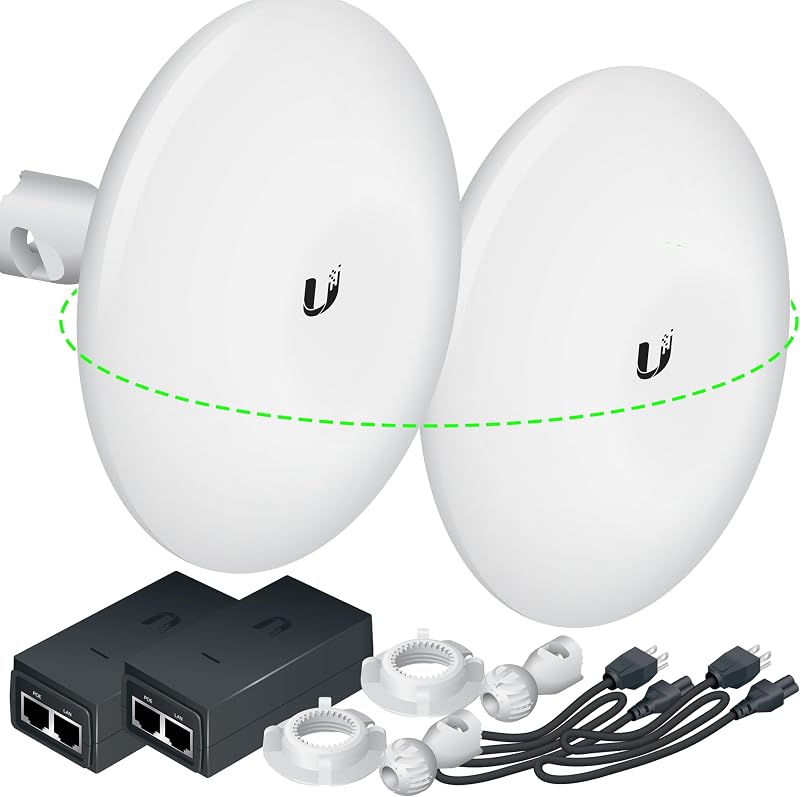
Best for: Workshops requiring dedicated pole or wall mounting
Pros
- Included ball-joint wall mounts
- Pre-tested point-to-point link
- Focused 16 dBi internal antenna
Cons
- 100 Mbps physical LAN port
- Older 802.11n wireless generation
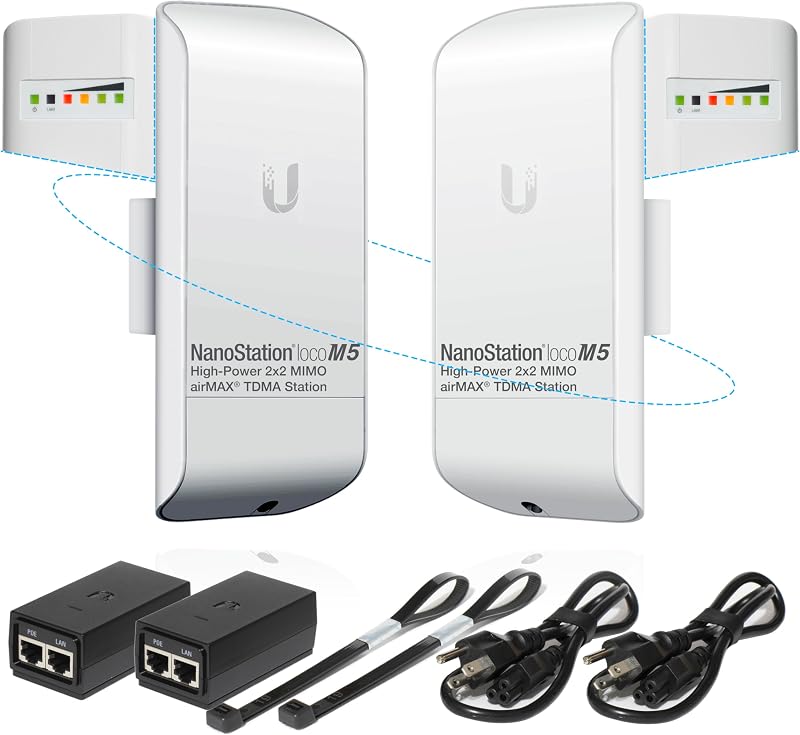
Best for: Secondary garages needing basic network extensions
Pros
- Pre-configured for instant setup
- Clean 5 GHz frequency band
- Compact outdoor enclosure
Cons
- Limited to 802.11n speeds
- Cannot reset without wiping configuration

Best for: Detached home offices needing modern throughput
Pros
- Pre-programmed plug-and-play pair
- 11ac protocol up to 450 Mbps
- Includes PoE injectors and straps
Cons
- Requires line-of-sight path
- Fixed mounting straps only
The Wireless Bridge Ubiquiti LOCO5AC PRE-CONFIGURED bundle delivers an accessible entry point into modern high-speed point-to-point bridging. Built around two paired units of the ubiquiti nanostation loco 5ac, this kit operates on the single-band 5 GHz spectrum using the 802.11ac wireless standard. According to the listing specifications, the hardware achieves a rated throughput of over 450 Mbps, while listing notes observe practical real-world speeds of 150+ Mbps across outdoor link distances reaching up to 15 kilometers. The operating system is airOS, and the hardware features two ports, touch-based control methodology, and built-in noise immunity features to maintain steady operation in congested wireless areas.
Because network pairing can prove daunting for everyday users, this bundle arrives pre-programmed and bench-tested before dispatch. The listing specifies that the access point and station roles are fully assigned, link encryption is enabled, link password protection is established, managed IP addresses are generated, and factory default passwords are changed for security. The bundle contains two paired airMAX NanoStation 5 AC Loco units, two Power over Ethernet (PoE) injectors with dedicated power cords, two zip-tie mounting straps, an installation guide, and an information sheet summarizing your network configuration. PoE passthrough functionality is activated on the hardware, and the system supports point-to-multipoint configurations if extra nodes are introduced down the line.
This package is especially well-suited for homeowners and small business operators wanting to connect a detached backyard studio, garden office, or utility garage without running physical cables. The modern 802.11ac protocol provides sufficient bandwidth for high-definition video conferencing, heavy file downloads, and streaming hardware feeds from aosu 4k security cameras outdoor wireless. It gives way to dish-style bridges like the LiteBeam when you must span massive multi-mile rural acreages, or to the UniFi Building-to-Building unit when you require multi-gigabit throughput integrated directly into a corporate UniFi controller.
Wireless Bridge Ubiquiti LOCOM5 PRE-CONFIGURED Configuration Applied, 2 Paired NanoStation Loco M5 (Ubiquiti), 2 POE
Check price on Amazon 4.9 out of 5 — average from Amazon buyers
The Wireless Bridge Ubiquiti LOCOM5 PRE-CONFIGURED kit is centered around two matched NanoStation Loco M5 units engineered to create a stable, low-profile connection across outdoor distances. Operating on the 5 GHz band using 802.11n Wi-Fi technology, this hardware offers a listed maximum transfer rate of 150 megabits per second and an operational range rated at up to 10 kilometers. The listing indicates that the bridge utilizes fixed internal antennas, features two ports, supports modern WPA2 and WPA3 security protocols, and interfaces via UniFi OS management with mobile app controls.
Like its 5AC sibling, this system is optimized and matched out of the box to streamline physical deployment. The bundle incorporates two paired NanoStation Loco M5 devices with pre-applied configuration profiles, two PoE injectors complete with electrical cords, two mounting straps, and an installation manual. Listing documentation notes that point-to-point roles are fixed, managed IP addresses are set, link encryption is active, and PoE passthrough is enabled. A critical warning highlighted in the listing reminds owners never to push the hardware reset button, as reverting to factory defaults permanently erases the custom vendor configuration and disables the instant plug-and-play functionality.
This model is an ideal pick for utility outbuildings, horse stables, and detached garages where internet needs remain standard. If you only intend to run basic web browsing, email, smart appliances, or simple perimeter security devices, the 150 Mbps throughput capability handles daily workloads without unnecessary technical complexity. However, it yields priority to the LOCO5AC or LiteBeam 5AC when you require the faster processing speeds and wider channel bandwidth of 802.11ac networking.
Wireless Bridge LBE-5AC-GEN2 PRE-CONFIGURED Bundle Pre-configured for convenience, with no complex setup required
Check price on Amazon 4.2 out of 5 — average from Amazon buyers
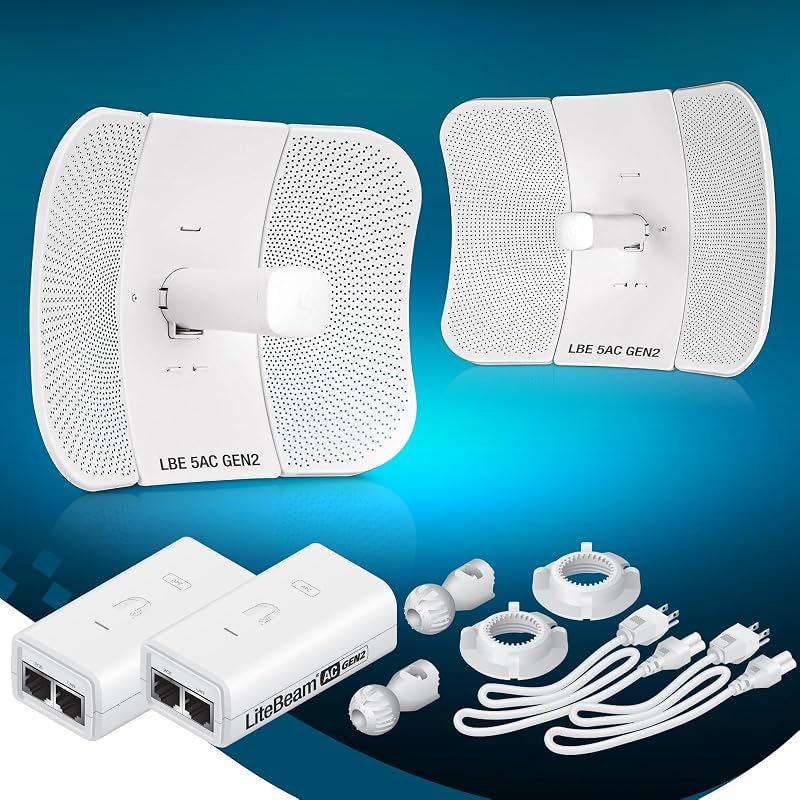
Best for: Long-distance rural and farm properties
Pros
- High-gain 23 dBi directional antenna
- Surge protection with precision mounts
- Over 450 Mbps transfer speeds
Cons
- Larger dish profile
- Requires precise physical alignment
When physical distances stretch across large rural properties, the Wireless Bridge LBE-5AC-GEN2 PRE-CONFIGURED Bundle provides the focused signal projection needed for dependable data transmission. Based on the ubiquiti litebeam 5ac platform, this kit includes two matched LiteBeam 5AC Gen 2 units operating on the 5 GHz single-band frequency via 802.11ac protocols. The listing details an impressive 450+ Mbps throughput rating over distances spanning 15+ kilometers. The hardware incorporates a high-gain, directional 2×2 MIMO antenna delivering 23 dBi of focused signal gain alongside integrated ESD surge protection.
A major structural advantage of this package lies in its physical mounting mechanism. Unlike compact station units that rely exclusively on standard zip ties, the LiteBeam Gen 2 provides dedicated pole and wall mounts featuring separated azimuth and elevation mechanical adjustments for millimeter-level optical aiming. The package includes two paired units, two PoE injectors with AC cords, mounting brackets, and a detailed setup manual. Management is listed as UniFi OS and app-controlled, with robust WPA2 and WPA3 security protocols securing the point-to-point wireless transmission against unauthorized interception.
This directional setup suits expansive rural acreage, farm outbuildings, detached guest cabins, and expansive commercial properties where traditional wide-beam antennas lose signal integrity. The narrow, focused radio pattern ensures exceptional noise immunity by ignoring off-axis RF clutter from neighboring networks. It gives way to smaller models like the NanoStation or NanoBeam when you need an unobtrusive, compact physical profile that mounts discretely against residential home siding without looking like a satellite dish.
Wireless Bridge Ubiquiti NBE-M5-16 PRE-CONFIGURED Ideal for expanding network coverage between buildings, linking distant
Check price on Amazon 4.4 out of 5 — average from Amazon buyers
The Wireless Bridge Ubiquiti NBE-M5-16 PRE-CONFIGURED bundle utilizes the proven ubiquiti nanobeam m5 architecture to deliver focused bridge performance in an integrated horn-and-reflector form factor. Operating on the 5 GHz band using 802.11n wireless protocols, the listing specifies a transfer rate of 100 megabits per second with physical LAN port bandwidth capped at 100 Mbps, alongside an extended 15+ kilometer link potential and 150+ Mbps real link speed notes. The internal directional antenna provides 16 dBi of gain, focusing RF energy tighter than flat-panel station designs while remaining far more compact than a full-size parabolic dish.
Arriving pre-programmed for immediate deployment, this package eliminates manual network configuration hurdles. The pre-tested bundle includes two paired NanoBeam M5-16 units, two PoE power injectors with line cords, two dedicated pole/wall mounts, an installation guide, and a credentials information sheet. The listing notes that station and access point roles are assigned, link encryption and customized passwords are implemented, default IP parameters are configured, and quality checks are conducted. Security protocols listed include WPA-PSK and WPA2-PSK encryption standards.
This model suits users who require an exceptionally sturdy, mechanically adjustable mounting system for precise aiming between residential or commercial buildings. The compact form factor and dedicated ball-joint bracket make it easy to align toward a detached shed or outbuilding holding a nest security camera system wireless hub. It gives way to 802.11ac hardware like the LOCO5AC or LiteBeam Gen 2 if your internal network traffic demands gigabit ports or higher wireless throughput ceilings.
Wireless Bridge Ubiquiti LOCOM2 PRE-CONFIGURED Configuration Applied, 2 Paired NanoStation Loco M2 (Ubiquiti), 2 POE
Check price on Amazon 4.5 out of 5 — average from Amazon buyers
Operating in a different wireless territory than its 5 GHz counterparts, the Wireless Bridge LOCOM2 PRE-CONFIGURED bundle harnesses the 2.4 GHz frequency band. Built around two matched ubiquiti loco m2 units, this system operates under 802.11 b/g/n hardware interfaces to generate data transfer rates up to 150 megabits per second. The listing documentation rates the physical hardware weight at 2 pounds for the two-unit package and identifies a link range capability extending up to 10 kilometers under proper outdoor operating conditions.
Pre-configured by vendor technicians prior to shipping, the kit arrives ready for mechanical attachment and cable connection. The bundle includes two paired NanoStation Loco M2 units, two PoE injectors with power cords, two zip-tie mounting straps, and an installation guide. The system checklist specifies pre-assigned roles, active link encryption, custom IP assignment, pre-tested wireless handshakes, and an explicit instruction not to reset the hardware to factory defaults. Desktop computers, game consoles, smart TVs, smartphones, and security cameras are explicitly listed as compatible receiving clients when connected through downstream hardware.
The primary advantage of choosing a 2.4 GHz wireless bridge lies in physical wave propagation. Higher frequencies like 5 GHz and 60 GHz suffer severe signal degradation when encountering foliage, tree branches, or minor physical obstructions. The longer wavelengths of this 2.4 GHz Loco bridge can navigate near-line-of-sight environments far more effectively than higher-frequency radios. However, in dense suburban neighborhoods where home routers congest the 2.4 GHz spectrum, this bridge gives way to 5 GHz and 60 GHz alternatives that offer cleaner channels and reduced radio interference.
Ubiquiti UniFi Building-to-Building Bridge Operates at 5.25 GHz frequency
Check price on Amazon 4.4 out of 5 — average from Amazon buyers
Best for: Demanding networks requiring gigabit performance
Pros
- Fast 60 GHz gigabit connectivity
- 25 GHz automatic weather backup
- Seamless UniFi software integration
Cons
- 500-meter maximum range
- Higher technical investment
For network setups demanding the absolute highest performance and zero wireless interference, the Ubiquiti UniFi Building-to-Building Bridge represents an entirely different class of engineering. Officially manufactured under part number UBB-US, this system utilizes high-frequency 60 GHz millimeter-wave technology to achieve true Gigabit Ethernet (GigE) transmission speeds over distances up to 500 meters. To combat the rain fade and atmospheric absorption that can occasionally disrupt 60 GHz frequencies during severe weather events, the hardware incorporates an integrated 5.25 GHz backup radio that automatically engages to maintain uninterrupted link connectivity.
Unlike the vendor-customized airMAX kits, this is an official Ubiquiti Networks product sold in pairs and engineered for native integration into the UniFi ecosystem. The bridge features low power consumption with an 11W maximum draw, a compact and discreet industrial casing, and an outer LED indicator ring that visually guides physical signal positioning and alignment. The system operates under UniFi OS and is easily accessible through the mobile app. Ubiquiti backs the system with an official 2-year limited manufacturer warranty, providing reassurance for business installations, campus networks, and demanding modern estates.
This premium system is designed for power users, detached luxury guest houses, and modern commercial offices that run heavy local server traffic, uncompressed multimedia, and multi-gigabit workloads. At the receiving building, you can route the gigabit drop cable directly into a dedicated switch or power a ubiquiti outdoor access point to bathe the entire remote interior and patio in seamless Wi-Fi. This bridge gives way to the airMAX product family when the distance between your two buildings surpasses the 500-meter operating boundary.
Matching a Model to Your Setup
- High-Speed Detached Office: If you are establishing a daily workspace in a backyard shed or finished garage and need modern 802.11ac throughput for videoconferencing and large file handling, choose the Wireless Bridge Ubiquiti LOCO5AC PRE-CONFIGURED.
- Long-Distance Acreage or Farm: When your goal is pushing internet access across hundreds of yards or miles of open pasture, fields, or rural terrain, select the Wireless Bridge LBE-5AC-GEN2 PRE-CONFIGURED Bundle for its high-gain 23 dBi directional dish antenna.
- High-Performance Campus or Smart Home: For users who manage their network inside the UniFi controller environment and demand gigabit transfer speeds across a short gap under 500 meters, deploy the Ubiquiti UniFi Building-to-Building Bridge.
- Properties with Light Tree Obstructions: If your link path encounters minor foliage, leaf cover, or tree branches where higher frequencies cannot maintain a line of sight, rely on the Wireless Bridge Ubiquiti LOCOM2 PRE-CONFIGURED to take advantage of superior 2.4 GHz signal penetration.
- Standard Garage or Security Outbuilding: When linking a secondary utility building primarily for automation controls, smart power equipment, or standard web browsing, the Wireless Bridge Ubiquiti LOCOM5 PRE-CONFIGURED provides dependable performance.
- Precision Alignment on Exterior Siding: If you need a compact, highly adjustable mounting ball joint to aim your bridge securely from residential walls, pick the Wireless Bridge Ubiquiti NBE-M5-16 PRE-CONFIGURED.
Before You Buy
While these bridge packages supply the radios, power supplies, and core mounting hardware, the product listings do not supply the exterior-grade cabling required to complete the installation. You will need to source your own UV-resistant, outdoor-rated, shielded Cat5e or Cat6 Ethernet cables to run from each bridge down your exterior wall and into your interior spaces. Furthermore, while the kits include wall mounts or pole straps, they do not include physical mounting poles, masonry anchor hardware, or cable entry grommets to seal exterior wall penetrations against rain intrusion.
It is equally important to understand how these bridging products deliver network access at the receiving destination. A point-to-point wireless bridge acts as an invisible Ethernet cable linking two points; the receiving station outputs connectivity exclusively through its Ethernet port. The bridge does not independently broadcast general-purpose Wi-Fi to smartphones, laptops, or tablets in the remote room. To distribute wireless coverage inside your garage, shed, or detached office, you must connect an indoor Wi-Fi router, mesh node, or separate access point to the receiving PoE injector’s LAN port.
FAQ
Does a wireless bridge replace an indoor Wi-Fi router?
No, an outdoor wireless bridge is designed strictly to create a direct data pipeline between two fixed physical locations. The remote unit terminates in an Ethernet cable and does not project standard indoor Wi-Fi for mobile client devices. To use Wi-Fi inside the destination building, connect that incoming Ethernet cable to the WAN or LAN port of a standard wireless router or dedicated access point.
Can these outdoor wireless bridges work through trees and walls?
Most wireless bridges, particularly those operating on 5 GHz and 60 GHz frequencies, require an unobstructed visual line of sight to maintain stable throughput and reliable connections. Solid obstacles like stone walls, dense tree trunks, and thick foliage absorb high-frequency signals rapidly. The 2.4 GHz model offers slightly better tolerance through light tree leaves, but clear visual alignment between both bridge faces remains the industry standard for reliable performance.
What happens if you factory reset a pre-configured wireless bridge?
If you press the physical reset button on any of the pre-configured bundles, all custom IP addresses, pairing parameters, link encryption keys, and role assignments will be wiped clean. The units will revert to their unlinked factory default state. Restoring network communication will then require manual access through a web browser to re-enter network subnets, bridge roles, and wireless security parameters from scratch.
Do these Ubiquiti bridges require running power cords outdoors?
No outdoor electrical outlets are required at the mounting location. All featured models utilize Power over Ethernet (PoE) technology. You place the included PoE injector indoors near a wall outlet, plug it into electrical power, and run a single shielded outdoor Ethernet cable up to the exterior bridge unit to deliver both electrical power and network data simultaneously.
How do 5GHz and 60GHz bridge links handle bad weather?
Standard 5 GHz radio bridges operate reliably through typical rain, snow, and fog with negligible signal degradation when properly aimed. The 60 GHz millimeter-wave band used on the UniFi Building-to-Building Bridge can experience attenuation during extreme, torrential downpours. However, that specific UniFi model features an integrated 5.25 GHz backup radio that automatically handles traffic if the 60 GHz link degrades, preventing complete connectivity drops.