
As Amazon Associates, we earn from qualifying purchases. This means we may receive a small commission at no extra cost to you if you click through and make a purchase.
Selecting the right epson all-in-one printers scanner copier setup requires balancing paper handling convenience, output volume, and desktop dimensions. Many home users find themselves choosing between modern bottle-filled tank hardware and conventional cartridge-based business machines. Whether your weekly routine involves digitizing single-page receipts, running double-sided school assignments, or scanning multi-page legal documents, matching the physical capabilities of an epson all-in-one printer to your exact workload ensures seamless day-to-day productivity without unexpected workflow bottlenecks.
Epson organizes its consumer and small-office hardware into two distinct functional families. The EcoTank series relies on high-capacity refillable reservoirs paired with keyed bottles to minimize consumable swaps over years of operation, making it a frequent focus when deciding which epson all-in-one to buy for family and remote work spaces. In contrast, the WorkForce Pro line is engineered around high-speed cartridge mechanisms, expansive paper trays, and rapid multi-sheet feeders designed for rigorous office schedules. Readers exploring alternatives beyond this catalog can also read our comparisons of hp all in one printers to see how hardware formats diverge across brands.
Epson All-in-One Printers Lineup at a Glance
| Model | Ink Technology | Print & Copy Speeds | Paper & Feeder Capacity |
|---|---|---|---|
| ET-2903 | EcoTank Supertank (Keyed Bottles) | 11 ISO ppm black / 6 ppm color; 11 cpm copy | 100-sheet input tray; Flatbed scanner |
| ET-2900 | EcoTank Supertank (Keyed Bottles) | 11 ISO ppm black / 6 ppm color; 11 cpm copy | 100-sheet input tray; Flatbed scanner |
| ET-2800 | EcoTank Supertank (Keyed Bottles) | 10 ISO ppm black / 5 ppm color; 10 cpm copy | Rear feed (plain, photo, envelopes); Flatbed scanner |
| WF-3820 | DURABrite Ultra Pigment Cartridges | 21 ISO ppm black / 11 ppm color; 40 cpm copy | 250-sheet paper tray; 35-page ADF |
| ET-4800 | EcoTank Supertank (EcoFit Bottles) | 10 cpm copy; Micro Piezo Heat-Free output | Listing does not specify tray; Flatbed scanner |
| ET-2803 | EcoTank Supertank (EcoFit Bottles) | 10 cpm copy; Micro Piezo Heat-Free output | Plain paper feed; Flatbed scanner |
The Models in Detail
Epson EcoTank ET-2903 Wireless All-in-One Color Epson EcoTank includes enough ink to last up to 3 years4
Check price on Amazon 4.9 out of 5 — average from Amazon buyers

Best for: Everyday home desks wanting a white exterior
Pros
- Up to 3 years of ink included
- Keyed EcoFit bottles prevent spills
- Clear 1.44-inch color screen
Cons
- No automatic document feeder
- Plain paper listing focus
The Epson EcoTank ET-2903 Wireless All-in-One Color serves home environments where clean styling and low-maintenance consumables take priority. Finished in a clean white chassis, this unit integrates refillable reservoirs that come supplied with enough ink to last up to three years under normal usage guidelines, translating to roughly 3,600 monochrome or 6,500 color pages. Refilling is guided by uniquely keyed EcoFit bottles that eliminate tank spills, while the permanent Heat-Free printhead operates with zero warmup delays. The integrated flatbed scanner captures documents with high clarity, and the 1.44-inch color display allows direct on-device copying up to 99 duplicates per run.
For general administrative tasks, this machine produces black text at 11 ISO pages per minute and color at 6 pages per minute, matching its copy speed rating of 11 pages per minute. The internal 100-sheet paper tray maintains a modest footprint of 12.5 inches deep by 14.2 inches wide, making it an easy fit for shallow credenzas or shared study tables. Borderless printing is natively supported, and wireless printing routes smoothly through the Epson Smart Panel application alongside Apple AirPrint and Mopria protocols.
This hardware is ideal for individuals or households needing a dependable epson printer scanner copier for homework, recipes, and personal filing. However, because it lacks an automatic document feeder and features a manual paper-turning process for double-sided jobs, users processing lengthy business contracts will find superior convenience stepping up to higher-tier office hardware.
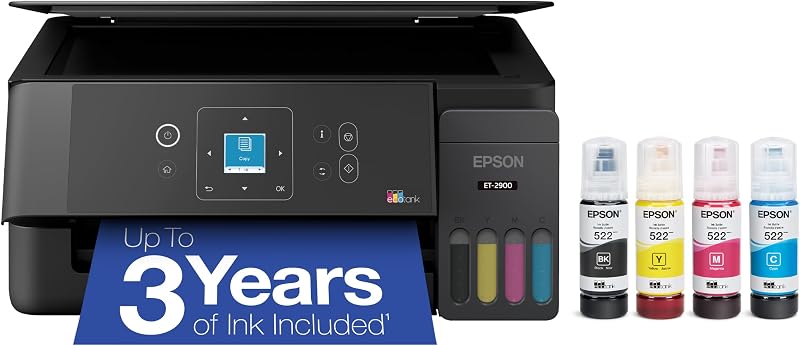
Epson EcoTank ET-2900 Wireless All-in-One Color Epson EcoTank includes enough ink to last up to 3 years4
Check price on Amazon 4.2 out of 5 — average from Amazon buyers
Best for: General home printing in classic black
Pros
- Generous 3-year inbox ink supply
- Fast 11 ppm monochrome copying
- Zero warmup heat-free printing
Cons
- Lacks automatic document feeder
- Manual two-sided document handling
Sharing the same core architecture as its white counterpart, the Epson EcoTank ET-2900 Wireless All-in-One Color delivers high-efficiency reservoir printing inside a traditional matte-black frame. It is supplied with an ink volume rated for up to 3,600 black pages and 6,500 color pages, eliminating the perpetual search for replacement cartridges. The machine relies on a four-color refill system utilizing black, cyan, magenta, and yellow keyed bottles, ensuring each color reservoir cannot be filled with the incorrect ink formulation.
Performance matches modern household demands with an 11 black and 6 color ISO page-per-minute print engine, complemented by an instant-on operational structure that requires no pre-heating. Document digitization happens directly across the flatbed platen, while the 1.44-inch color panel simplifies standalone copying routines up to 99 pages without needing a paired personal computer. Measuring 6.4 inches tall and weighing 9.3 pounds, the epson ecotank et-2900 integrates seamlessly into space-constrained home workstations.
This model suits home office workers who generate standard plain-paper memos, invoices, and single-page forms on a weekly basis. It gives way to more rugged office-centric devices when a workflow shifts toward automatic duplex scanning or large-batch document processing, as the ET-2900 relies strictly on manual flatbed positioning for copies and scans.
Epson EcoTank ET-2800 Wireless Color All-in-One COLOR PRINTING — Up to 2 years of ink in the box4 (and with every replacement
Check price on Amazon 4.5 out of 5 — average from Amazon buyers

Best for: Families printing varied media like photos
Pros
- Yields up to 4,500 black pages
- Supports glossy photo paper and envelopes
- Hands-free voice printing support
Cons
- Heavier 11.4-pound desktop footprint
- One-year spare parts availability
The Epson EcoTank ET-2800 Wireless Color All-in-One is an established cartridge-free desktop tool engineered for versatile home tasks. Outfitted with Micro Piezo Heat-Free Technology, the unit ships with an initial ink complement capable of producing up to 4,500 black pages and 7,500 color pages, providing up to two years of printing straight from the box. Unlike narrow single-media devices, its feed pathway accommodates plain paper, envelopes, and glossy photo paper, giving it added versatility for creative assignments and domestic correspondence.
Operational speeds settle at 10 ISO pages per minute for monochrome text, supported by a 10 page-per-minute copy engine. Navigating settings is straightforward, and the printer supports wireless connectivity from Android and mobile operating systems alongside voice-activated printing tools. The flatbed scanner handles bound books, personal cards, and loose pages with equal stability, while the external dimensions span 22.8 inches wide by 14.8 inches deep with paper supports extended.
For families balancing school projects and occasional photo printing alongside everyday utility bills, the epson ecotank et-2800 remains a dependable workhorse. Workspaces handling urgent, rapid-fire business collating may prefer models with higher mechanical print speeds, but the ET-2800 delivers exceptional everyday media breadth for domestic tasks.
Epson Workforce Pro WF-3820 Wireless Color Built for speed — PrecisionCore Heat-Free Technology delivers fast
Check price on Amazon 4.9 out of 5 — average from Amazon buyers

Best for: Fast-paced home offices scanning multi-page paperwork
Pros
- Blazing 21 black ppm print speed
- Automatic two-sided printing
- 35-page automatic document feeder
Cons
- Requires genuine ink cartridges
- Substantial 19.4-pound body
The Epson Workforce Pro WF-3820 Wireless Color departs from the supertank design, utilizing a commercial-grade cartridge platform powered by PrecisionCore Heat-Free Technology. Using quick-drying DURABrite Ultra pigment inks, this machine yields smudge-resistant, laser-sharp black and color text. Engineered specifically for demanding output volumes, it produces pages at a rapid 21 ISO pages per minute for monochrome files and 11 pages per minute for full color, supported by an impressive black copy rating of 40 pages per minute.
Productivity is further reinforced by a substantial 250-sheet paper capacity tray and a built-in 35-page automatic document feeder (ADF). This allows users to place multi-page reports into the feeder for automated scanning and copying rather than lifting the flatbed lid for every single sheet. In addition, native automatic two-sided printing cuts paper consumption in half without requiring manual sheet flipping. While commercial buyers might also explore our overview of an epson all in one color laser printer, this inkjet alternative delivers immediate professional document turnaround.
The epson workforce pro wf-3820 is specifically geared toward professionals managing high-volume client filings, multi-page legal paperwork, and rapid correspondence. It yields precedence to the EcoTank family only for shoppers seeking to eliminate cartridge repurchasing altogether, as the WF-3820 requires genuine Epson ink cartridges to maintain operation.
Epson EcoTank ET-4800 Wireless Color All-in-One Zero Cartridge Waste – By using an EcoTank printer, you can help reduce the
Check price on Amazon 4.2 out of 5 — average from Amazon buyers
Best for: Compact workstations needing supertank efficiency
Pros
- Cartridge-free EcoFit ink system
- Built-in color navigation screen
- Micro Piezo Heat-Free imaging
Cons
- Paper tray capacity omitted in specs
- 10 ppm monochrome copy speed
The Epson EcoTank ET-4800 Wireless Color All-in-One combines bulk-tank refill economics with structured administrative utility. Utilizing Micro Piezo Heat-Free Technology, this supertank printer uses cleanly keyed EcoFit ink bottles to keep the large internal ink reservoirs filled without dripping. A vibrant color screen sits on the control fascia, allowing users to direct copies, inspect wireless settings, and initiate scanner functions with minimal menu hopping.
The flatbed scanning glass captures clear reproductions of receipts, identity cards, and standard plain-paper correspondence. It matches a 10 page-per-minute monochrome copy velocity, and the chassis remains comfortably compact on the desk with a footprint measuring 13.6 inches deep, 14.7 inches wide, and 9.3 inches high at a manageable weight of 11 pounds. Communication options support laptop integration and mobile control via Android frameworks.
Shoppers looking for a reliable, moderate-speed office machine will find the epson ecotank et-4800 an attractive choice for continuous drafting and general filing. Where it steps aside is in high-capacity document processing routines: users who require automated double-sided printing or high-capacity bulk paper drawers will find the WorkForce Pro line better aligned with those demands.
Epson EcoTank ET-2803 Wireless Color All-in-One Stress-Free Printing — Up to 2 years of ink in the box (4) – and with every
Check price on Amazon 4.2 out of 5 — average from Amazon buyers
Best for: Shared households wanting lightweight mobile printing
Pros
- Lightest build at 8.8 pounds
- High 7,500 color page yield
- Epson Smart Panel app connectivity
Cons
- Wider 22.8-inch desk profile
- Flatbed-only scanning mechanism
The Epson EcoTank ET-2803 Wireless Color All-in-One brings cartridge-free supertank printing to desks where device weight and setup simplicity are paramount. Tipping the scales at an ultra-light 8.8 pounds, this machine incorporates EcoFit reservoirs that come packaged with two years of ink, totaling up to 4,500 black pages and 7,500 color pages. Each replacement bottle set equates to roughly 80 standard ink cartridges, drastically reducing physical consumables waste.
Equipped with a flatbed scanner, a color navigation screen, and a monochrome copy rate of 10 pages per minute, the ET-2803 handles routine administrative duplication smoothly. Mobile connectivity is fully realized through Apple AirPrint, hands-free voice printing, and the comprehensive Epson Smart Panel application, enabling fast phone-to-print execution. For individuals setting up home workstations alongside equipment like brother printers all in one wireless stations, the ET-2803 represents an accessible entry point into continuous ink delivery.
This model is well suited for students, remote consultants, and shared households needing a straightforward, lightweight color machine for everyday reports and forms. When printing demands expand to large collated manuscripts or high-speed multi-sheet duplicating, moving to an ADF-equipped unit like the WF-3820 is the recommended path.
Matching a Model to Your Setup
- Shared household work area with white decor: Choose the Epson EcoTank ET-2903 Wireless All-in-One Color for its contemporary white casing, 100-sheet paper capacity, and three-year inbox ink bottle supply.
- High-volume office paper processing: Deploy the Epson Workforce Pro WF-3820 Wireless Color for its 21 ppm black print speed, automatic two-sided printing, and 35-page automatic document feeder.
- Family desktop handling photo paper and crafts: Select the Epson EcoTank ET-2800 Wireless Color All-in-One to take advantage of its verified compatibility with glossy photo paper, envelopes, and plain sheets.
- Compact personal desk running standard black hardware: Use the Epson EcoTank ET-2900 Wireless All-in-One Color for its zero warmup time, 9.3-pound profile, and high-yield 3,600-page black bottle capacity.
- Lightweight student workspace requiring simple wireless setup: Pick the Epson EcoTank ET-2803 Wireless Color All-in-One to leverage its featherweight 8.8-pound body, Apple AirPrint, and Epson Smart Panel app control.
- Dedicated study room needing straightforward tank copying: Opt for the Epson EcoTank ET-4800 Wireless Color All-in-One for its easy-to-read color display, EcoFit bottle system, and compact desktop footprint.
Before You Buy
When comparing these specifications, note that certain hardware accessories and functional details are omitted from the product listings. None of the product descriptions state whether a physical USB printer cable is supplied in the retail packaging, which means shoppers planning a direct, non-Wi-Fi wired connection should plan to supply their own cable. Additionally, while wireless functionality and mobile apps like Apple AirPrint and Epson Smart Panel are highlighted, the listings do not specify whether the Wi-Fi hardware supports dual-band 5 GHz frequencies or relies exclusively on standard 2.4 GHz home networks.
Furthermore, mechanical handling differences require attention before finalizing a purchase. The EcoTank models listed feature flatbed scanner glass, but their listings do not specify automatic duplex scanning capabilities, meaning double-sided originals must be flipped manually sheet by sheet. Similarly, while the WorkForce Pro WF-3820 confirms an automatic 2-sided print engine and a 250-sheet tray, the ET-4800 listing omits its exact paper tray sheet capacity. Verifying your preferred paper stock and monthly document volume against these hardware limits prevents mismatched expectations.
FAQ
What is the core difference between an EcoTank and a cartridge printer?
An ecotank vs cartridge printer comparison centers on how ink is stored and replenished. The EcoTank models use large integrated ink reservoirs filled directly from keyed, drip-free bottles that hold enough ink for thousands of prints. Cartridge printers like the WorkForce Pro WF-3820 use self-contained, replaceable ink tanks that click into a moving carriage, trading the vast page yields of bottle reservoirs for pigment-based ink performance and faster output speeds.
Can I use third-party ink in these Epson printers?
Epson listings across both lines strongly emphasize that their printing systems are engineered to function exclusively with genuine Epson inks. For the EcoTank models, genuine EcoFit bottles are specifically keyed to fit the appropriate color reservoir. For the WorkForce Pro WF-3820, genuine cartridges are required, and the listing explicitly notes that damage caused by non-genuine ink formulations is not covered under the limited warranty.
Do all of these Epson all-in-one models have automatic document feeders?
No, the majority of the EcoTank units evaluated here—including the ET-2903, ET-2900, ET-2800, ET-4800, and ET-2803—feature built-in flatbed scanners designed for single-sheet documents, bound books, or delicate papers placed manually on the glass. The Epson WorkForce Pro WF-3820 is the only model in this selection that includes a dedicated 35-page automatic document feeder to scan and copy multi-page paperwork automatically.
Which models support mobile printing from a smartphone or tablet?
Wireless mobile operation is widely supported across the lineup. The ET-2903, ET-2900, and ET-2803 specifically detail compatibility with the Epson Smart Panel app, Apple AirPrint, and Android printing protocols. The ET-2800 and ET-2803 also advertise hands-free voice-activated printing support, while the WF-3820 lists direct smartphone compatibility for quick document queuing.
Are these printers capable of printing borderless photos and documents?
Borderless printing is explicitly listed as a core feature on the EcoTank ET-2903 and ET-2900, enabling edge-to-edge output without white margins. The ET-2800 specifically lists glossy photo paper among its compatible print media, making it suitable for photo tasks, though users should ensure their target paper dimensions align with the media handling rules detailed in each device’s manual.