
As Amazon Associates, we earn from qualifying purchases. This means we may receive a small commission at no extra cost to you if you click through and make a purchase.
If your household leaves in a rush, the most useful lock feature is not remote access or voice control; it is a door that locks itself when nobody remembers to. Schlage offers that auto-lock behavior on some models and not others, and the listings are not always clear about it. So this guide starts with the auto-lock question for each model, then looks at how you get in: a keypad with physical buttons, a touchscreen, or a smart Wi-Fi lock you can also manage from your phone.
Across the six listings, the Schlage range sorts into three groups. The basic electronic locks, the Keypad Lever, the Keypad Deadbolt and the Touch deadbolt, run on a 9V battery and have no app. The Wi-Fi smart locks, Encode and Arrive, connect straight to your home network and the Schlage Home app. The Connect uses Z-Wave and needs a separate smart home hub. Only two listings explicitly describe auto-lock: the Keypad Lever and the Encode. We compared listings and specifications, not installations on our own doors, and we say plainly where auto-lock is not mentioned.
Schlage Auto-Locking Deadbolts Lineup at a Glance
| Model | Auto-lock in listing | Entry method | Connectivity |
|---|---|---|---|
| Schlage Electronic Keypad Lock (lever) | Yes, 5 seconds after code | Backlit keypad | None |
| Schlage Encode Smart WiFi Deadbolt | Yes, adjustable delay or off | Touchscreen, app, key | WiFi |
| Schlage Electronic Keypad Deadbolt | Not mentioned | Backlit keypad | None |
| Schlage Arrive Smart WiFi Deadbolt | Not mentioned | Push-button keypad, app | WiFi |
| Schlage Touch Electronic Deadbolt | Not mentioned | Touchscreen | None |
| Schlage Connect Smart Deadbolt | Not mentioned | Touchscreen | Z-Wave (hub required) |
The Models in Detail
Schlage Electronic Keypad Lock (Lever) High-quality metal construction provides strength where it counts
Check price on Amazon Our score: 8.4/10

Best for: Simple keypad entry on a budget
Pros
- Grade 2/AAA rating
- Backlit silicone buttons
- Limited lifetime mechanical warranty
Cons
- No auto-lock listed
- Lock by button and thumbturn

Best for: Garage entry or office doors with a lever
Pros
- Auto-locks 5 seconds after code entry
- Grade 2/AAA rating
- Up to 2 years on a 9V battery
Cons
- Lever lock, not a deadbolt
- No app control
The Schlage Electronic Keypad Lock in Camelot trim and aged bronze is a lever handle lock rather than a deadbolt, and it has the clearest auto-lock description in the range: it relocks the door 5 seconds after a code is entered, and you leave by simply turning the handle. It carries a Grade 2/AAA rating for residential and light commercial use, and the silicone-coated number buttons light up when pressed.
It runs on an included 9V battery, which Schlage says lasts up to 2 years with typical use, and has a low-battery indicator. It replaces an existing lever or knob with just a screwdriver. The listing names front, back and garage entry doors and home offices as good uses.
This suits a garage entry door, side door or home office where you want the door locked behind every person without thinking. Because it is a lever lock, many households pair it with a separate deadbolt on exterior doors. For more lever options, see our look at Schlage electronic door locks.
Schlage Encode Smart WiFi Deadbolt Lock Lock and unlock from anywhere, manage up to 100 access codes for keyless
Check price on Amazon Our score: 9.2/10
Best for: Families wanting auto-lock plus remote control
Pros
- Adjustable auto-lock delay
- Built-in WiFi, no hub
- Up to 100 access codes
- Built-in alarm
Cons
- Batteries last up to six months
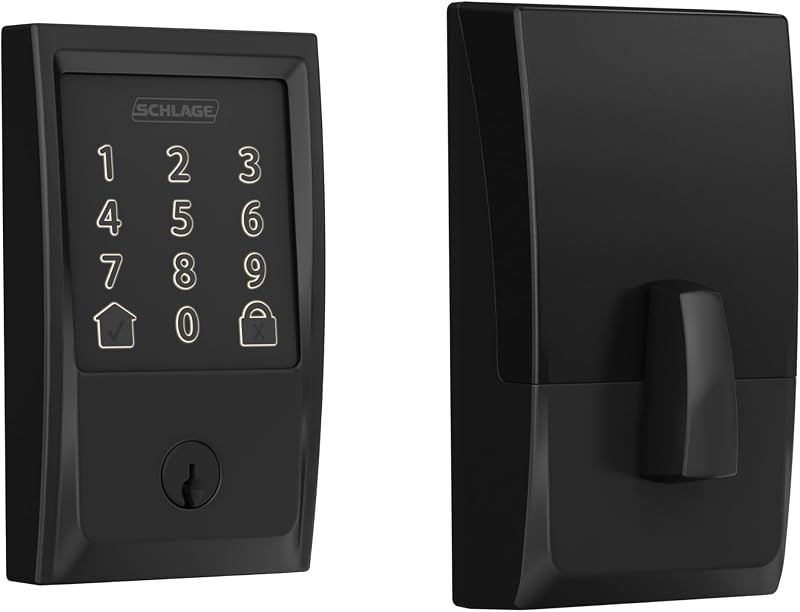
The Schlage Encode Smart WiFi Deadbolt Lock in Century trim and matte black is the most complete answer to the auto-lock question. Auto-lock relocks the door after a delay you choose, or can be turned off, and one-touch locking from the exterior touchscreen handles quick departures. Built-in WiFi connects it to the Schlage Home app without a hub, letting you lock and unlock from anywhere, manage up to 100 access codes, view history and get notifications.
It works with Alexa and Google Home, includes a built-in alarm for door movement and forced entry, and carries the highest residential BHMA rating for security, durability and finish. It uses four AA batteries lasting up to six months, with one backup key, and fits standard door thicknesses and backsets. The Snap ‘n Stay design holds it on the door during installation.
This is the pick for families who want auto-lock plus the ability to check or lock the door from work. The trade-off is more frequent battery changes than the 9V models.
Schlage Electronic Keypad Deadbolt Lock High-quality metal construction provides strength where it counts
Check price on Amazon Our score: 8.0/10
The Schlage Electronic Keypad Deadbolt Lock in Camelot trim and satin nickel is a straightforward keypad deadbolt. You unlock with a valid code and lock from outside by pressing the Schlage button and turning the outside thumbturn. The listing does not describe auto-lock, so the door stays unlocked until someone locks it.
It has a Grade 2/AAA rating, backlit silicone buttons, a 9V battery and a 6-digit programming code in the box, and carries a limited lifetime mechanical warranty with 1 year on electronics.
It suits households who mainly want to stop carrying keys and do not mind locking by hand. If forgetting to lock is the issue, the Encode is the better fit.
Schlage Arrive Smart WiFi Deadbolt Lock Lock and unlock from anywhere, manage up to 250 access codes for keyless
Check price on Amazon Our score: 8.4/10

Best for: Smart homes preferring physical buttons
Pros
- Up to 250 access codes
- Built-in WiFi
- Links to doorbells and lights in routines
Cons
- Listing does not mention auto-lock
The Schlage Arrive Smart WiFi Deadbolt Lock in Camelot trim and matte black is a WiFi lock with physical, backlit, all-weather silicone buttons instead of a touchscreen. It manages up to 250 access codes, the most here, and offers remote locking, history and notifications through the Schlage Home app. It links with Alexa and Google Home and can join routines with video doorbells and smart lights.
It carries the highest residential BHMA rating and installs with a screwdriver using interactive digital instructions. The listing does not mention auto-lock or battery type, so if a self-locking door is essential, confirm this before buying.
It suits smart homes that prefer the feel of buttons, and short-term rental hosts who need many codes. Remote locking from the app covers forgetful moments.
Schlage Touch Electronic Deadbolt Lock Replace an existing deadbolt yourself with no skill required–install in
Check price on Amazon Our score: 8.2/10
Best for: Runners and busy families going keyless
Pros
- No keyway to bump or pick
- Up to 19 codes
- Slim fit behind screen doors
- 3-year electronics warranty
Cons
- No auto-lock listed
- No app control
The Schlage Touch Electronic Deadbolt Lock in Century trim and matte black uses a cylinder-free design, so there is no keyway to bump or pick. It comes with 2 pre-programmed codes and holds up to 19. A fingerprint-resistant touchscreen with downlighting keeps codes private, and a jumpstart feature gives backup access if the 9V battery dies.
It has a Grade 2/AAA rating, a slim profile that fits between a front door and screen door, and a 3-year electronics and limited lifetime mechanical warranty. The listing does not mention auto-lock.
It suits runners, dog walkers and families who want keyless simplicity without an app. Our guide to a Schlage deadbolt lock with key covers the alternative if you want a backup cylinder.
Schlage Connect Smart Deadbolt Lock Easy to install with just a screwdriver
Check price on Amazon Our score: 8.2/10
Best for: Homes with an existing Z-Wave hub
Pros
- Z-Wave smart home integration
- Up to 30 access codes
- Built-in alarm
Cons
- Hub sold separately
- Listing does not mention auto-lock
The Schlage Connect Smart Deadbolt Lock in Camelot trim and satin nickel is a Z-Wave Plus lock that pairs with a compatible smart home or security hub, sold separately, for remote control and automation scenes. It manages up to 30 access codes on a fingerprint-resistant touchscreen and has encryption and a built-in alarm.
Voice control requires the Z-Wave system plus a compatible voice assistant. Snap ‘n Stay helps installation. The listing does not describe auto-lock, though a hub automation may be able to lock it on a schedule.
It suits homes with an existing Z-Wave hub. Without one, the Encode is simpler.
Matching a Model to Your Setup
- Kids who never lock the front door behind them: Schlage Encode with auto-lock on.
- Garage entry door that should always relock: Schlage Electronic Keypad Lock (lever).
- Vacation rental host managing many guest codes: Schlage Arrive.
- Front door with a storm door and no app wanted: Schlage Touch.
- Existing Z-Wave security system: Schlage Connect.
- Simple key-free entry, lock by hand: Schlage Electronic Keypad Deadbolt.
Before You Buy
Four of the six listings do not mention auto-lock at all, so if that feature is your priority, the Encode and the Keypad Lever are the only ones confirmed here. The Arrive listing does not state battery type or life, and warranty details appear only on the Keypad Deadbolt and Touch listings.
The listings do not specify how auto-lock behaves if the door is open when the timer runs out. In general, measure your door thickness and backset before ordering; the smart models list 1-3/8 to 1-3/4 inch doors and 2-3/8 or 2-3/4 inch backsets.
FAQ
Which Schlage deadbolt locks automatically?
In this lineup, the Encode lists adjustable auto-lock. The Keypad Lever also auto-locks but is a lever lock.
Can I turn off auto-lock on the Encode?
Yes, the listing says it can be turned off completely or set to different delays.
Do Schlage WiFi locks need a hub?
No, Encode and Arrive connect directly to home WiFi. The Connect needs a Z-Wave hub.
How long do batteries last?
Up to 2 years on the Keypad Lever’s 9V and up to six months on the Encode’s four AA batteries.
Which Schlage lock holds the most codes?
The Arrive, with up to 250.