As Amazon Associates, we earn from qualifying purchases. This means we may receive a small commission at no extra cost to you if you click through and make a purchase.
A mini Cricut earns its place on a small desk because it can stay plugged in next to your laptop instead of living in a cupboard. That changes how you use it: a quick label for the pantry, a birthday card at the last minute, a decal for a water bottle. The choice between Cricut’s compact machines comes down to how wide your projects need to be, whether you want to print and cut stickers, and which bundle of materials gets you started on the thing you actually plan to make.
The listings cover three machine generations. The original Cricut Joy is the smallest, sold here on its own as a used unit, with a digital image bundle, and in a card bundle. The Joy Xtra is the wider model, offered in a T-shirt bundle with a Mini EasyPress and a vinyl bundle for labels and decals. The Joy 2 is the newest generation, which works with a home inkjet printer for full-color stickers, sold here as an Essential Bundle. We compared listings, bundles and stated capabilities rather than cutting projects on each machine.
Cricut Mini Cutting Machine Lineup at a Glance
| Product | Machine | Bundle focus | Condition or extras |
|---|---|---|---|
| Cricut Joy Xtra T-Shirt Bundle | Joy Xtra | Iron-on apparel | Mini EasyPress, Smart Iron-On, tools |
| Cricut Joy 2 Essential Bundle | Joy 2 | Stickers, cards, decals | Rainbow sampler of materials |
| Cricut Joy Machine and Digital Content | Joy | Getting started | 30 digital images |
| AMZ Joy Card Bundle | Joy | Greeting cards | Card mat, cards, gel pens, tool kit |
| Cricut Joy Xtra Vinyl Bundle | Joy Xtra | Labels and decals | Rainbow Smart Vinyl, transfer tape, tools |
| Cricut Joy Machine | Joy | Machine only | Sold used |
The Models in Detail
Cricut Joy Xtra Cutting Machine T-Shirt Bundle Includes Cricut Joy Xtra machine, Cricut Mini Heat Press, Smart Iron-On
Check price on Amazon Our score: 8.8/10
Best for: Labels, decals and classroom organizing
Pros
- Joy Xtra with rainbow Smart Vinyl
- Transfer tape and tools
- Matless Smart Vinyl loading
Cons
- Machine specs thin in listing
- Vinyl-focused, no iron-on

Best for: Making custom shirts and totes at home
Pros
- Joy Xtra plus Mini EasyPress
- Smart Iron-On and tools included
- Heat transfer design guides
Cons
- Heat press needs extra desk space
- Active area figures conflict
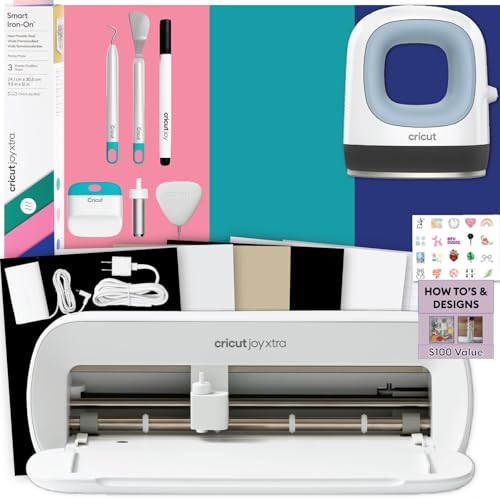
The Cricut Joy Xtra Cutting Machine T-Shirt Making Bundle pairs the Joy Xtra with a Cricut Mini EasyPress heat press, Smart Iron-On materials, crafting tools and heat transfer design guides. It is built around one workflow: design, cut the iron-on, weed it and press it onto a shirt, tote, hat or baby outfit.
The Mini EasyPress is aimed at small designs, curved surfaces and hard-to-reach spots, which is where a household iron struggles. The listing lists a 1-year warranty against manufacturer defects and an active surface area of 92 square inches, while the separate Joy Xtra vinyl bundle lists 68.75 square inches for what appears to be the same machine, so treat both figures with caution.
This is the bundle for anyone whose main plan is custom apparel, from family event shirts to small-batch gifts. If you mainly want labels and decals, the vinyl bundle is a better fit, and you save desk space without the press.
Cricut Joy 2 Essential Bundle Cricut Joy 2 is the next generation of our ultra-compact cutting machine
Check price on Amazon Our score: 9.0/10

Best for: Full-color stickers with an inkjet printer
Pros
- Newest Joy generation
- Print then cut stickers
- Rainbow sampler of materials
- Works with 75+ materials
Cons
- Project count claims conflict
- Printer sold separately
The Cricut Joy 2 Essential Bundle with Rainbow Sampler features Cricut’s newest ultra-compact machine. Its headline feature is print-then-cut: print a design on your home inkjet printer, and the Joy 2 recognizes the sheet and cuts around the printed design to make full-color stickers. The description gives its size as 4.5 inches and its weight as just over 2 pounds.
The listing says it works with over 75 materials and writes, draws, foils, scores and cuts. It connects over Bluetooth to the Design Space app on mobile or desktop. The bundle includes Smart Vinyl, Smart Iron-On, Value Cardstock, Insert Card Sets, Printable Vinyl and tools. The item highlight says “up to 65 projects” while a feature bullet mentions access to over 400 projects, which likely refer to different things; the listing does not clarify. The machine carries a 1-year limited warranty.
This is the pick for sticker makers, planners and anyone who wants the newest model in the smallest footprint. If your projects need more width, the Joy Xtra is the step up.
Cricut Joy Machine and Digital Content Library Bundle CUTS 50plus MATERIALS WITH EASE
Check price on Amazon Our score: 8.2/10
Best for: Trying a Cricut on a tight budget
Pros
- Original compact Joy
- 50+ materials, writes and foils
- Bluetooth Design Space app
Cons
- Sold as a used unit
- No materials or tools included
Best for: Beginners wanting the original Joy plus images
Pros
- 30 bonus Design Space images
- Matless Smart Material cuts
- Bluetooth with phone or laptop
Cons
- Weight listed as both lb and kg
- No materials included
The Cricut Joy Machine & Digital Content Library Bundle pairs the original Joy with 30 digital images that are added to your Design Space account during setup. It cuts over 50 materials, including cardstock, vinyl and iron-on, using the included blade and a StandardGrip mat, and it can make long matless cuts with Smart Materials.
It connects over Bluetooth to Design Space on iOS, Android, Windows and Mac. The listing weight is inconsistent: a feature bullet says 3.9 pounds while the description says 3.9 kilograms. The mat and blade are mentioned in the features, but the included components field lists only the machine and the digital bundle, so check what arrives.
This suits a beginner who wants a new original Joy and a few ready-made designs to start with. Anyone who needs materials in the box should look at the card or Joy 2 bundles.
AMZ Joy Card Bundle BUNDLE INCLUDES – Cricut Joy Smart Cutting Machine, Card Sampler (Pastel
Check price on Amazon Our score: 8.8/10

Best for: Handmade greeting cards
Pros
- Card mat and 8-card sampler
- 10 glitter gel pens
- 3-piece tool kit
Cons
- Listing names a different bundle
- Original Joy, not Xtra or 2
The AMZ Joy Card Bundle is built around handmade cards. It includes the Cricut Joy, a Card Machine Mat, a pastel Card Sampler of 8 cards with 8 holographic backers and 8 envelopes, a 10-color set of glitter gel pens with 0.8mm points and a 3-piece Joy tool kit.
The card sampler gives exact sizes: cards at 4.25 by 5.5 inches, backers at 4.1 by 5.3 inches and envelopes at 4.37 by 5.75 inches. One odd detail is that the included components field reads “Cricut Joy Iron On Bundle”, which does not match the rest of the listing.
This is the Cricut Joy card bundle for anyone who wants to make birthday and thank-you cards at the kitchen table. For stickers or larger decals, the Joy 2 or Joy Xtra bundles are better suited.
Cricut Joy Xtra Cutting Machine and Smart Vinyl Bundle Includes Cricut Joy Xtra machine, rainbow Smart Vinyl, transfer tape
Check price on Amazon Our score: 9.0/10
The Cricut Joy Xtra Cutting Machine and Smart Vinyl Bundle is aimed at labels, decals and organization. It includes the Joy Xtra, rainbow permanent Smart Vinyl, transfer tape, tools and digital design guides. Smart Vinyl loads without a mat, which speeds setup and allows longer continuous cuts.
The listing suggests water bottles, classroom labels, wall decals, storage bins and notebooks. It gives product dimensions of 5.5 by 12.5 by 5.5 inches and an active surface area of 68.75 square inches. Beyond that, the listing gives little detail about the machine itself, such as material count or connectivity.
This suits teachers, home organizers and anyone who labels everything. If you want to make shirts too, the T-shirt bundle adds the heat press.
Cricut Joy Machine Cuts intricate designs with precision
Check price on Amazon Our score: 9.2/10
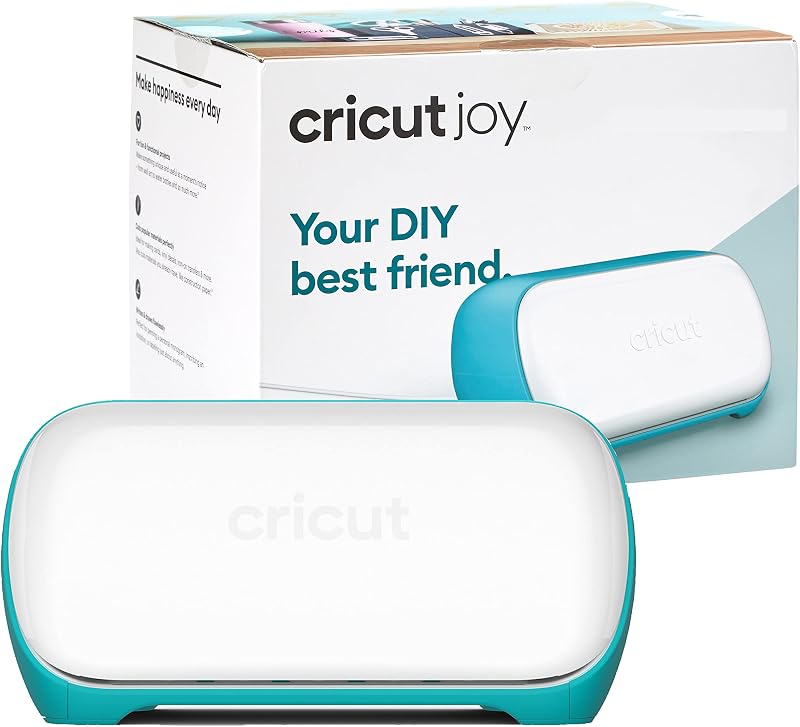
The Cricut Joy Machine in blue is the original compact model on its own, and the title marks it as used. It works with over 50 materials, cuts intricate designs, writes, draws and foils, and connects over Bluetooth to the free Design Space app. The listing mentions free workshops, courses and support by phone or chat.
The description notes that it requires a compatible device with Bluetooth and a high-speed internet connection, and that materials, tools and accessories are sold separately. The listing does not describe the condition of the used unit or whether a warranty applies.
This suits someone who wants to try a Cricut before committing to a newer model or bundle. Buyers who want a new machine should choose one of the bundles instead. For more on how the full-size machines compare, see our guide to the Cricut vinyl cutter range.
Matching a Model to Your Setup
- Custom shirts, totes and baby clothes: Cricut Joy Xtra T-Shirt Bundle with the Mini EasyPress.
- Full-color stickers from your home printer: Cricut Joy 2 Essential Bundle.
- Greeting cards on a tiny desk: AMZ Joy Card Bundle.
- Pantry, classroom and storage bin labels: Cricut Joy Xtra Smart Vinyl Bundle.
- A new original Joy with a few starter designs: Cricut Joy Machine and Digital Content Library Bundle.
- Testing the idea with minimal commitment: Cricut Joy Machine, sold used.
Before You Buy
All of these machines rely on the Design Space app and a Bluetooth device, and the original Joy listing says a high-speed internet connection is required. None of the listings describe subscription features in detail. Plan your desk space for the machine plus a cutting mat, and for the T-shirt bundle, a heat-safe surface for the press. If the craft corner shares a desk with a small single-serve coffee machine, keep liquids well away from mats and materials.
Several listings have inconsistent details: active surface area figures for the Joy Xtra differ between bundles, the Joy weight is given in both pounds and kilograms, and the card bundle names an iron-on bundle in its components field. The used Joy listing does not describe condition or warranty. The Joy Xtra listings do not state machine weight or material count.
FAQ
What is the difference between Cricut Joy, Joy Xtra and Joy 2?
The Joy is the original compact model, the Joy Xtra is wider, and the Joy 2 is the newest compact model that works with a home inkjet printer for stickers.
Which mini Cricut is best for stickers?
The Joy 2, which the listing says can recognize and cut around designs printed on a home inkjet printer.
Can a mini Cricut make T-shirts?
Yes. All the machines here cut iron-on, and the Joy Xtra T-Shirt Bundle adds a Mini EasyPress to apply it.
Does the Cricut Joy need a mat?
It uses a mat for most materials, but Smart Materials load without one for long cuts.
Is the standalone Cricut Joy new?
No. The listing title marks it as used.
Which Cricut mini cutting machine should I buy?
Pick by project: the Joy 2 for stickers, the Joy Xtra bundles for shirts or labels, and the card bundle for greeting cards.