
As Amazon Associates, we earn from qualifying purchases. This means we may receive a small commission at no extra cost to you if you click through and make a purchase.
Shoppers exploring a kodak portable printer are usually deciding between two distinct snapshot experiences: quick adhesive stickers for journals and craft projects, or laminated, frame-ready snapshots that look like classic lab photographs. Modern smartphones hold thousands of pictures, but transferring those memories to physical surfaces like refrigerators, family collages, and travel diaries requires matching print technology to your living space. Choosing the right portable photo printer for phone images means balancing media size, print durability, replenishment formats, and whether the hardware will live on a dedicated desk or travel inside a daily shoulder bag.
Within the brand’s catalog, the lineup divides cleanly into two core technologies: 4PASS dye sublimation and ZINK zero-ink printing. The dye sublimation models, which include desk-based stations and retro pocket units, rely on integrated ribbons to transfer yellow, magenta, and cyan color layers before sealing the paper under a transparent protective coating. Conversely, the kodak zink printer models use thermal activation on specialized sheets containing embedded dye crystals, creating compact 2×3-inch sticky-back stickers without separate ink cartridges. Understanding this technological split is the foundational step in any kodak photo printer comparison, allowing you to establish which kodak printer to buy based on your intended display methods.
Kodak Portable Photo Printers Lineup at a Glance
| Model | Print Technology | Print Dimensions | Primary Intended Use |
|---|---|---|---|
| KODAK Dock Plus 4×6 Photo Printer | 4PASS Dye Sublimation | 4×6 Inches | Stationary home desktop printing and direct phone docking |
| KODAK Mini 2 Retro 2×3 Portable | 4PASS Dye Sublimation | 2×3 Inches | Pocket-friendly travel keepsakes and wallet prints |
| KODAK Mini 3 Retro 3×3 Portable | 4PASS Dye Sublimation | 3×3 Inches | Square scrapbooking layouts and wall grid displays |
| KODAK Step Wireless Mobile Photo Mini | ZINK Zero Ink | 2×3 Inches | Instant peel-and-stick photo stickers on the go |
| KODAK Step Printer Wireless Mobile Photo | ZINK Zero Ink | 2×3 Inches | Laptop decorating, locker collages, and school crafts |
| Kodak Step Instant Color Photo Printer | ZINK Zero Ink | 2×3 Inches | Casual event favors, party crafts, and starter scrapbooking |
The Models in Detail
KODAK Dock Plus 4×6 Photo Printer Genuine 4PASS dye sublimation printing
Check price on Amazon Our score: 9.0/10
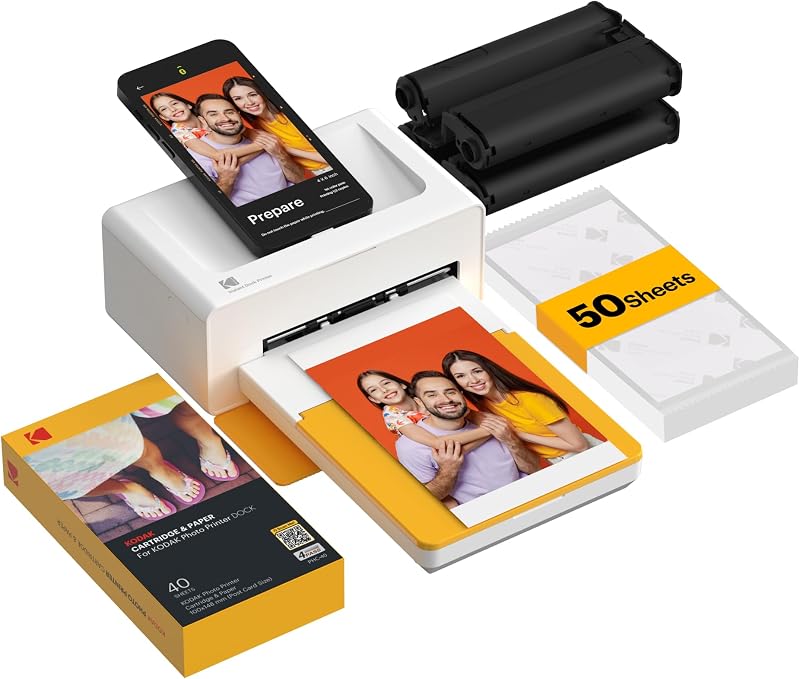
Best for: Framed family portraits and home desktop printing
Pros
- Standard 4×6 borderless prints
- Charges phone while docked
- Protective lamination layer
Cons
- Requires wall outlet power
- Bulkier desktop footprint
The KODAK Dock Plus 4×6 Photo Printer serves as a stationary desktop station designed for households that prioritize standard postcard-sized prints over pocket mobility. Measuring 4.5 inches deep by 8.5 inches wide and 2 inches high, this model is built for stable tabletop placement near a standard wall outlet. Its primary physical feature is an integrated smartphone docking station that allows you to seat a compatible iOS or Android phone directly onto the housing, establishing a reliable connection while actively charging the device during printing sessions. For users who prefer cordless operation, the unit also supports wireless Bluetooth transmission directly from mobile devices and tablets through the KODAK Photo Printer app.
Operating on genuine 4PASS dye sublimation technology, this desktop unit transfers ink across four sequential stages: yellow, magenta, cyan, and a final clear lamination layer. The listing notes an output speed of approximately 55 seconds per print, yielding glossy photo paper prints that are designed to resist water, fingerprints, and ambient fading over time. Because it utilizes four separate passes, the dock plus provides borderless printing that matches standard photo frame dimensions, making it well suited for family albums, bedside frames, and wall collages. This specific retail bundle supplies 50 photo sheets to get home printing underway immediately.
Where smaller battery-powered alternatives emphasize transportability, this unit is deliberately tied to household power to sustain consistent, everyday photo sessions without battery exhaustion. For households setting up a dedicated desk in a compact workroom or climate-managed studio alongside portable air conditioners black and decker units, the printer requires only a modest footprint next to existing desktop electronics. If you want a mobile companion to toss into a pocket during a day trip, this model gives way to the compact handheld units in the brand’s catalog. However, for a dedicated crafting corner or living room command station where family members can dock their phones and print 4×6 images in under a minute, the Dock Plus offers the largest physical format among the brand’s current personal printers.
KODAK Mini 2 Retro 2×3 Portable The KODAK Mini 2 Retro is a portable photo printer designed to turn
Check price on Amazon Our score: 8.6/10
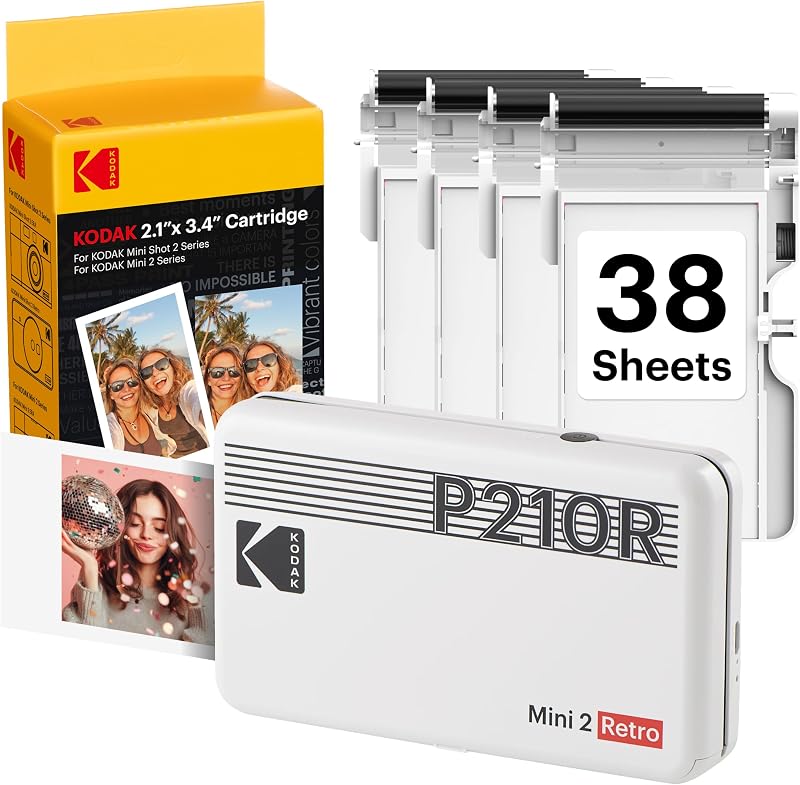
Best for: Everyday travel keepsakes and wallet photos
Pros
- Pocketable 255g body
- Waterproof 4PASS lamination
- Includes 38 print sheets
Cons
- Non-adhesive photo backing
- Slow multi-pass printing cycle
For creators who want dye-sublimation fidelity in a pocketable chassis, the KODAK Mini 2 Retro 2×3 Portable shrinks multi-pass technology down to a 255-gram handheld footprint. Measuring 3 inches deep, 5 inches wide, and 1 inch thick, this pocket printer pairs with smartphones via Bluetooth through the KODAK Photo Printer app. The vintage-inspired exterior houses an internal print mechanism capable of generating credit-card-sized 2×3-inch pictures without tethering you to a desk. The included bundle provides the printer, four all-in-one cartridges, 38 sheets of glossy photo paper, a USB Type-C charging cable, and a user guide.
Like its larger tabletop sibling, the kodak mini 2 retro relies on 4PASS dye sublimation to apply three separate layers of color before applying an anti-fingerprint, waterproof protective laminate. The print process takes approximately 55 seconds per picture, rolling the media in and out of the slot until the full color spectrum and lamination barrier are fixed. This lamination ensures that prints handled immediately after emerging remain free of skin oils and moisture damage. The resulting 2×3-inch keepsakes fit naturally inside wallets, clear smartphone cases, personal planners, and mini albums.
While larger stationary units cater to standard picture frames, this model is tailored for spontaneous on-the-go printing at social gatherings, school events, and vacations. It gives way to the square-format Mini 3 when users prefer symmetrical compositions, or to the ZINK-based Step line when peel-and-stick adhesive backs are needed. For anyone who prioritizes laminated dye-sublimation color fidelity over sticker functionality while keeping the hardware small enough for a jacket pocket, the Mini 2 Retro provides a balanced handheld compromise.
KODAK Mini 3 Retro 3×3 Portable The KODAK Mini 3 Retro is a portable photo printer designed to turn
Check price on Amazon Our score: 8.0/10

Best for: Square scrapbook layouts and social media snapshots
Pros
- Balanced 3×3 square format
- Protective clear topcoat
- Convenient Type-C charging
Cons
- Wider and heavier than Mini 2
- Non-sticky photo paper
The KODAK Mini 3 Retro 3×3 Portable expands on the portable dye-sublimation concept by introducing a distinct 3×3-inch square print format. With body measurements of 4 inches deep, 5 inches wide, and 1 inch high, and an overall weight of 399 grams, it remains thoroughly portable while catering to the popular aesthetic of modern square photography. It connects to mobile devices through Bluetooth, utilizing the KODAK Photo Printer app to allow cropping, filtering, and template customization prior to output. The white bundle includes the printer itself, four cartridges, 38 sheets of glossy photo paper, a USB Type-C charging cable, and an introductory manual.
Utilizing 4PASS dye sublimation, the Mini 3 applies yellow, magenta, and cyan ribbon layers followed by a clear topcoat in approximately 55 seconds. The resulting square images benefit from the same moisture-resistant, fingerprint-proof, and fade-resistant lamination that defines Kodak’s 4PASS system. This square aspect ratio makes it particularly popular for bulletin board grids, photo booth party stations, journaling spreads, and square refrigerator displays that mimic social media layouts without requiring custom border cropping.
When weighing the kodak mini 3 retro against the Mini 2, the primary trade-off is physical width and weight; the unit adds roughly 144 grams and an extra inch of depth to accommodate the wider print throat. If your main objective is credit-card wallet pictures, the narrower Mini 2 remains easier to carry in slim pockets. However, if your visual projects center around scrapbooks, artistic craft boards, or square keepsakes that require more image area than a 2×3 print can supply, the Mini 3 Retro delivers that expanded canvas with full lamination protection.
KODAK Step Wireless Mobile Photo Mini STEP UP YOUR PRINTING GAME
Check price on Amazon Our score: 9.4/10

Best for: Quick peel-and-stick stickers and mobile scrapbooking
Pros
- Ultra-lightweight 0.07kg chassis
- Peel-and-stick adhesive back
- No ink ribbons needed
Cons
- Limited to 25 prints per charge
- Smaller 2×3 print area
Departing from ribbon cartridges, the KODAK Step Wireless Mobile Photo Mini utilizes zero-ink technology to generate 2×3-inch adhesive-backed prints on the fly. Weighed at just 0.07 kg (less than a quarter of a pound), this ultra-lightweight black printer connects to smart devices using either Bluetooth or NFC. Operation is managed through the companion KODAK App, which includes a comprehensive suite of creative tools such as photo collages, decorative borders, novelty stickers, text overlays, and color adjustment filters.
Instead of running multiple ribbon passes, this printer activates embedded dye crystals inside thermal paper sheets under precise thermal pulses. The entire image appears in a single pass taking under 60 seconds, eliminating ribbons, toners, and wet cartridges completely. The resulting prints feature a peel-off backing that converts your photos into durable stickers resistant to water, tears, smudges, and moisture. The unit contains an internal lithium-ion rechargeable battery rated to output approximately 25 prints per full charge, making it self-contained for afternoon outings or craft sessions.
Shoppers comparing the Step Mini to the 4PASS series will find that ZINK media prioritizes adhesive flexibility and mechanical simplicity over multi-layer dye sublimation laminates. For compact living quarters or tiny home utility spaces that already prioritize space-saving appliances like a black decker portable washer, the palm-sized Step printer avoids bulky storage requirements. It gives way to the Dock Plus when traditional 4×6 picture frames are the goal, but for teenagers, journal enthusiasts, and scrapbookers who want to stick instant selfies directly onto folders, water bottles, and locker doors, it represents a very streamlined travel tool.
KODAK Step Printer Wireless Mobile Photo No More Making Plans to Print Tomorrow
Check price on Amazon Our score: 9.4/10
Best for: Locker decorating, laptops, and student crafts
Pros
- Zero-ink thermal technology
- Bluetooth and NFC pairing
- Sticker-backed paper
Cons
- Battery limited to 25 shots
- Heavier one-pound body
The KODAK Step Printer Wireless Mobile Photo brings zero-ink technology to mobile photo printing in a clean white chassis packaged as a gift bundle. Measuring 2.9 inches deep, 4.7 inches wide, and 0.9 inches high with an operating weight of 16 ounces, this model offers a palm-sized form factor built for backpacks, tote bags, and desk drawers. It syncs with Android and iOS devices through Bluetooth or tap-to-pair NFC, utilizing the free Kodak App to crop, frame, and customize digital camera rolls before transmitting files.
At the core of the kodak step printer is ZINK thermal technology, which uses specialized 2×3-inch photo sheets embedded with cyan, yellow, and magenta dye crystals that activate upon heating. Because no ink cartridges or print heads are required, maintenance is limited entirely to loading fresh paper packs. The printed media includes an adhesive back, transforming snapshots into immediate stickers designed to resist moisture, tearing, and surface smudges. An integrated lithium-ion battery powers the unit for up to 25 prints per full charge cycle, with each individual print ejecting in less than 60 seconds.
In everyday use, this gift bundle caters to crafters, students, and travelers who want to decorate laptop sleeves, dorm walls, and personal notebooks without carrying liquid inks or bulky replacement cartridges. While the 4PASS Mini models produce prints with higher resistance to long-term fading due to their dedicated sealing overcoat, the Step Printer’s sticky backing adds practical crafting utility that dye-sublimation sheets lack. For buyers who prioritize quick sticker production over framed permanence, this white Step bundle delivers dependable on-the-spot printing.
Kodak Step Instant Color Photo Printer STEP UP YOUR PRINTING GAME
Check price on Amazon Our score: 8.4/10
Best for: Casual crafters, parties, and vibrant gifts
Pros
- Tear-resistant sticky prints
- One-pass thermal printing
- Easy NFC and Bluetooth setup
Cons
- 25 prints per charge ceiling
- No multi-layer lamination coating
Styled in a vibrant pink casing, the Kodak Step Instant Color Photo Printer starter bundle delivers the same zero-ink thermal hardware tailored for gift-giving and creative desktop accents. With exterior dimensions of 4.7 inches deep, 2.9 inches wide, and 0.9 inches high, and a chassis weight of 16 ounces, it fits effortlessly into a shoulder purse or backpack compartment. The device pairs with iOS and Android smartphones via Bluetooth or NFC connectivity, connecting directly to the Kodak App for collage creation, text captioning, and filter selection.
Operating without ribbons or liquid ink supplies, the printer warms the color-forming crystals inside 2×3-inch ZINK thermal sheets to produce full-color pictures in under 60 seconds. Each print exits the front slot dry to the touch, coated with a protective exterior layer that resists moisture, smudging, rips, and accidental tears. The peel-away backing turns each output into a sticky photo label, allowing instant mounting to photo albums, vision boards, luggage tags, and greeting cards. Its internal lithium-ion rechargeable battery handles up to 25 photo prints before requiring a recharge.
When taking creative gear to outdoor festivals, backyard parties, or tailgate setups powered by a daranener portable power station, having an ink-free printer that charges from USB prevents interruptions. While users seeking standard 4×6 picture frame keepsakes will naturally lean toward the KODAK Dock Plus, this pink Step starter bundle is customized for party hosts, younger crafters, and social creators who value bold aesthetics and peel-and-stick versatility.
Matching a Model to Your Setup
- Shared Family Command Centers: The KODAK Dock Plus 4×6 Photo Printer is built for household desks and kitchen counters where family members can dock their phone, charge their device, and print classic 4×6 framed photographs.
- On-the-Road Travel Journaling: The KODAK Mini 2 Retro 2×3 Portable fits neatly into carry-on luggage or daily backpacks, offering laminated, waterproof prints that slip smoothly into passport wallets, personal planners, and travel notebooks.
- Social Media Scrapbooks and Art Boards: The KODAK Mini 3 Retro 3×3 Portable is tailored for creative crafters who prefer modern square layouts for vision boards, album grids, and mini tabletop easels without border cropping.
- School Projects and Locker Decorating: The KODAK Step Wireless Mobile Photo Mini provides ultra-lightweight portability for students who want immediate peel-and-stick photos to personalize notebooks, school lockers, and pencil cases.
- Dorm Rooms and Laptop Personalization: The KODAK Step Printer Wireless Mobile Photo serves college students and hobbyists wanting a clean, ink-free white unit capable of producing 2×3 adhesive stickers for laptops, mirrors, and gift tags.
- Party Favors and Creative Gifting: The Kodak Step Instant Color Photo Printer in pink makes an approachable starter device for young crafters and event hosts making instant photo booth stickers for guests.
Before You Buy
Before selecting a model, review what is omitted from the packaging and product listings. While the dye-sublimation bundles (such as the Dock Plus and Mini Retro printers) state included paper counts—such as 50 sheets for the Dock Plus and 38 sheets across four cartridges for the Mini 2 and Mini 3—the listings do not specify the exact replacement cost per print over the lifetime of the machine. Furthermore, while the Step models specify an internal battery life of approximately 25 prints per charge, the listings do not specify the exact battery milliamp-hour capacity or the precise charging duration required to reach 100 percent from an empty state.
In addition, connectivity and power specifications leave several operational questions open. The KODAK Dock Plus requires a wall outlet connection for power, but the listing does not state the total cord length or power adapter wattage. For the portable Step models, while both Bluetooth and NFC pairing are highlighted, the manufacturer listings do not specify the supported Bluetooth version or whether the companion app requires ongoing cloud account registration to access basic collage and border filters. Keep in mind that ZINK paper and 4PASS cartridges are entirely non-interchangeable; a 4PASS machine cannot feed thermal ZINK paper, and a Step printer cannot accept dye-sublimation cartridges.
FAQ
What is the difference between 4PASS and ZINK printing?
4PASS technology uses dye sublimation, applying yellow, magenta, and cyan color ribbons in three separate passes followed by a clear protective lamination layer that resists moisture and fingerprints. ZINK, or Zero Ink technology, uses heat to activate dye crystals embedded directly inside thermal paper, producing prints in a single pass without separate cartridges. 4PASS models generate standard glossy photos, while ZINK sheets feature peel-and-stick adhesive backs.
Can you use regular photo paper in a Kodak portable printer?
No. Kodak portable printers require their proprietary media formats. The 4PASS printers require dedicated cartridges that contain matched ink ribbons and photo sheets sized specifically for each model, while Kodak Step printers require ZINK Zero Ink paper with heat-sensitive color crystals. Standard desktop inkjet or laser photo paper will not work and could damage the internal feed mechanisms.
How long does it take to print a photo on these Kodak models?
According to the product specifications, the 4PASS printers (including the Dock Plus, Mini 2 Retro, and Mini 3 Retro) complete their multi-pass process in approximately 55 seconds. The Kodak Step ZINK printers complete their single-pass thermal output in under 60 seconds.
Does the Kodak Dock Plus require a battery to operate?
The KODAK Dock Plus 4×6 Photo Printer is designed as a desktop home printing station and connects directly to a power outlet. It does not run on an internal battery, unlike the handheld Mini Retro and Step models which feature rechargeable power sources for travel use.
Which Kodak printer is best for making stickers?
The Kodak Step series—including the Step Wireless Mobile Photo Mini, the Step Printer Wireless Mobile Photo, and the Kodak Step Instant Color Photo Printer—is specifically designed for sticker creation. All Step models utilize 2×3-inch ZINK paper featuring peel-off sticky backings, making them suitable for crafting, scrapbooking, and surface labeling.
Matching the right snapshot unit to your travel or scrapbooking habits ensures your phone memories do not stay trapped on a screen. However, if your home workspace also demands high-speed document output alongside photo crafts, our comprehensive Laser Printer Guide offers practical comparisons for everyday desktop hardware. Evaluating both specialty photo tools and daily multi-function machines guarantees a balanced printing setup tailored to every project.