
As Amazon Associates, we earn from qualifying purchases. This means we may receive a small commission at no extra cost to you if you click through and make a purchase.
A presence sensor fixes the most annoying habit of motion-based smart lighting: switching the lights off while you sit still at your desk, read on the couch or work at a laptop. Aqara’s mmWave radar sensors detect a person who is barely moving, which makes them a better fit for home offices, living rooms and bedrooms than basic PIR motion sensors. The choice between them comes down to how you power the sensor, which hub or ecosystem you use, how many zones you need and whether you want extras such as environmental readings, fall detection or headcounts.
According to the listings, Aqara’s range here is organized by connection and power. The FP2 connects over 2.4GHz Wi-Fi without a hub and offers zone detection, with a separate bracket set for corner mounting. The FP1E is a simpler Zigbee sensor that needs an Aqara hub. The FP300 is battery powered and adds light, temperature and humidity readings. The FP400 is the newest and most capable, with multi-zone headcounts over Thread or Zigbee. The Zigbee door and window sensor three-pack is not a presence sensor, but it pairs well with one for entry-based automations.
Aqara Presence Sensor Lineup at a Glance
Best for: FP2 users needing corner mounting
Pros
- Angle mount for corner install
- Removes corner dead zones
- Same FP2 features listed
Cons
- Unclear if sensor is included
- Range spec looks wrong
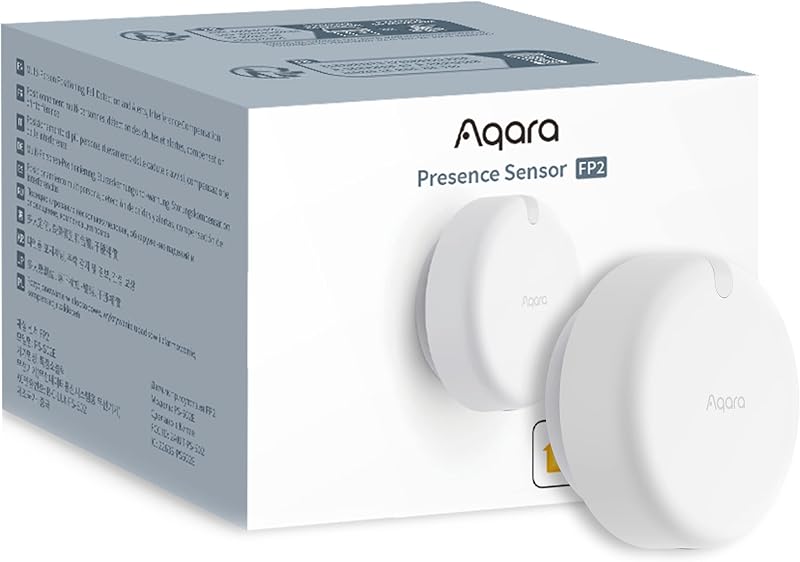
Best for: Home offices and zoned living rooms
Pros
- Up to 30 zones, 5 people
- Wi-Fi, no hub needed
- Fall detection and sleep monitoring
Cons
- 4GHz Wi-Fi only
- Needs wired power

Best for: Rooms with no outlet nearby
Pros
- Battery powered, wire-free
- MmWave plus PIR, light, temp, humidity
- Up to 3 years battery in Zigbee
Cons
- Shorter 6 m range
- Thread needs a border router

Best for: Large open-plan rooms with many zones
Pros
- Headcount tracking up to 10 people
- Matter over Thread and Zigbee
- AI-assisted room setup
Cons
- Needs newer Aqara hub or border router
- Wired USB-C power
| Model | Connection | Power | Listed range and zones |
|---|---|---|---|
| Aqara Presence Sensor FP400 | Matter over Thread, Zigbee | USB-C wired | Up to 10 x 8 m side-mounted, multi-zone, 10 people |
| Aqara Presence Sensor FP300 | Matter over Thread, Zigbee | Two CR2450 batteries | Up to 6 m, 120° view |
| Aqara Presence Sensor FP2 | 2.4GHz Wi-Fi | Wired DC | Up to 40 m² area, 30 zones, 5 people |
| Aqara Zigbee Presence Sensor FP1E | Zigbee via Aqara hub | 5V/1A adapter, not included | 6 m sensing distance |
| Aqara Presence Sensor FP2 Bracket Set | 2.4GHz Wi-Fi | Wired | Corner mounting for FP2 |
| Aqara Zigbee Door and Window Sensor, 3 Pack | Zigbee via Aqara hub | Not specified | Hub within 400 inches |
The Models in Detail
Aqara Presence Sensor FP400
Check price on Amazon 4.4 out of 5 — average from Amazon buyers
The Aqara Presence Sensor FP400 is built to replace several sensors in a large space. It divides a room into independent custom zones and tracks headcounts for up to 10 people in real time. Aqara says its 60GHz mmWave radar has five times the point-cloud density of earlier generations and uses AI background learning, so a blowing curtain should not switch lights on and sitting still on the couch should not switch them off.
Setup is AI-assisted: the sensor identifies room boundaries and entrances and learns to ignore background noise. It has a 120° field of view, a magnetic base for side, corner or ceiling mounting and a reach of up to 10 x 8 meters when side-mounted. It is powered over USB-C and connects via Matter over Thread or Zigbee, working with Apple Home, Home Assistant, Google Home, Alexa and SmartThings. Hub compatibility is specific: it works with the Aqara Hub M3, M200, M100, Camera Hub G5 Pro and Doorbell G410, but not with older hubs such as the M1S, M2, G2H or G3.
The FP400 suits open-plan living and kitchen spaces, shared home offices or any room where you want different automations for the desk, sofa and doorway. If your room is small and you only need on/off presence, the FP1E or FP300 is simpler.
Aqara Presence Sensor FP300 Wireless 5-in-1
Check price on Amazon 4.1 out of 5 — average from Amazon buyers
The Aqara Presence Sensor FP300 Wireless 5-in-1 is the only battery-powered presence sensor here. It combines 60GHz mmWave radar, a PIR sensor, a light sensor and temperature and humidity sensors in a 1.65 x 1.65 x 1.97-inch body. Aqara says adaptive AI tunes its sensitivity to cut false triggers.
Two replaceable CR2450 batteries are included, rated for up to 3 years in Zigbee mode or 2 years in Thread mode, and you can turn off unused sensors to save power. It has a 120° field of view, a detection range of up to 6 meters and a multi-axis adjustable mount for wall, ceiling or corner placement. It supports Matter over Thread and Zigbee, with Apple Home, Home Assistant, Alexa, Google Home, SmartThings and Homey listed; third-party Matter use needs a Thread border router.
This is the sensor for rooms with no convenient outlet, such as a hallway, bathroom or a desk in the middle of a room. Its temperature and humidity readings also make it useful for fan or heating automations. For large spaces, the FP400’s longer reach and zones are the better fit.
Aqara Presence Sensor FP2
Check price on Amazon 3.6 out of 5 — average from Amazon buyers
The Aqara Presence Sensor FP2 connects over 2.4GHz Wi-Fi only, so it does not need an Aqara hub. A single unit covers up to 40 square meters (430 sq ft), supports up to 30 zones such as a sofa, bed or desk, and detects up to five people at once. You can mark interference areas to ignore plants, curtains or pets and set a filter height to ignore fans or crawling pets.
Ceiling mounting enables Fall Detection Mode, which sends an app alert if a fall is detected. The listing also describes elderly care features, including inactivity alerts and non-wearable sleep monitoring of duration, stages, heart rate and respiration. It has a built-in light sensor and runs automations locally. It appears as multiple sensors in HomeKit, Alexa, Google Home and Home Assistant. The FP2 needs wired DC power and has an operating range of 14 °F to 104 °F.
The FP2 suits a home office where you want the desk lamp and monitor to stay on while you work, or a living room with separate zones. It is also the one for anyone caring for an older relative. Homes built around Thread may prefer the FP400.
Aqara Zigbee Presence Sensor FP1E
Check price on Amazon 4.7 out of 5 — average from Amazon buyers

Best for: Aqara Zigbee hub owners on a budget
Pros
- Detects still occupants
- AI filters small pets
- 200 ms response time
Cons
- Aqara Zigbee hub required
- 5V adapter not included
The Aqara Zigbee Presence Sensor FP1E is the straightforward option for homes that already have an Aqara Zigbee 3.0 hub. It uses mmWave radar to detect people who are moving or still, as well as how long they stay in each state, with a listed response time of 200 milliseconds and a 6-meter sensing distance.
Aqara’s AI helps identify and ignore small pets, and AI spatial learning adapts to the room. It plugs into a 5V/1A DC adapter, which is not included, and requires an Aqara Zigbee hub, also not included. Through Matter-over-bridge support, it works with HomeKit, Alexa, Google Home, Home Assistant and Homey. One specification line gives an upper temperature rating of 10 °C, which seems very low for an indoor sensor and is likely an error.
The FP1E suits a bedroom or bathroom where you need reliable presence without zones or headcounts. If you have no Aqara hub, the Wi-Fi FP2 avoids buying one.
Aqara Presence Sensor FP2 Bracket Set
Check price on Amazon 4.3 out of 5 — average from Amazon buyers
The Aqara Presence Sensor FP2 Bracket Set adds an angle mount that lets you install the FP2 in a room corner. After mounting, you switch to the matching mode in the app, which rotates the room layout by 45 degrees and removes dead zones caused by the sensor’s angle.
The rest of the listing repeats FP2 features: up to five people, zone positioning, sleep monitoring, fall detection, 2.4GHz Wi-Fi and support for HomeKit, Alexa, SmartThings and Home Assistant. It also mentions IPX5, which the main FP2 listing does not. The title includes the FP2 name, but the listing does not clearly state whether the sensor itself is in the box, and the 40-meter sensing distance line appears to confuse area with range.
Choose this if the best spot for your FP2 is a corner, which is common in small offices and bedrooms. Confirm the contents before ordering.
Aqara Zigbee Door and Window Sensor, 3 Pack
Check price on Amazon 4.0 out of 5 — average from Amazon buyers
Best for: Adding door and window triggers
Pros
- Three sensors per pack
- Triggers hub alarm and automations
- Tiny 1.61 in body
Cons
- Aqara hub required
- Not SmartThings compatible
The Aqara Zigbee Door and Window Sensor three-pack is a contact sensor, not a presence sensor, but it complements one well. Each sensor measures 1.61 x 0.86 x 0.43 inches and allows a gap of up to 0.86 inches, working on doors, windows, drawers and cabinets. It alerts your phone and can trigger the hub’s local alarm on an unexpected opening.
An Aqara hub is required and sold separately, and the sensor should stay within 400 inches of the hub. It works with Apple HomeKit and Alexa, but the listing states it is not currently compatible with SmartThings. For a wider view of entry sensors, see our guide to wireless security sensors.
Use these to start an automation when you open the office door, then let a presence sensor keep the lights on while you are inside. They are not a substitute for presence detection.
Matching a Model to Your Setup
- Desk lights that stay on while you type in a home office: Aqara Presence Sensor FP2.
- An open-plan living room with sofa, dining and kitchen zones: Aqara Presence Sensor FP400.
- A hallway or bathroom with no outlet: Aqara Presence Sensor FP300.
- A bedroom in a home already running an Aqara Zigbee hub: Aqara Zigbee Presence Sensor FP1E.
- A small office where only a corner mount works: Aqara Presence Sensor FP2 Bracket Set.
- Lights on when the office door opens: Aqara Zigbee Door and Window Sensor with any presence sensor.
Before You Buy
Check your hub before choosing. The FP1E and door sensors need an Aqara hub, the FP400 only works with specific newer Aqara hubs or a Thread border router, and the FP2 needs 2.4GHz Wi-Fi. Power adapters are not always included: the FP1E listing states its adapter is sold separately, and the FP2 and FP400 listings do not say whether one is included. If you want video as well as presence, our Aqara HomeKit camera guide covers that side.
Several listings contain questionable specs, including the FP1E’s 10 °C upper temperature rating, the bracket set’s 40-meter sensing distance and the FP2’s frequency listed in hertz. Advanced features such as zone setup, fall detection and sleep monitoring also depend on the Aqara Home app and may not be available in every third-party platform.
FAQ
Which Aqara presence sensor should I buy for a home office?
The FP2 is a strong fit, with zones for your desk and no hub needed. The FP400 is the step up for larger or shared rooms.
Does the Aqara FP2 need a hub?
No. The FP2 connects over 2.4GHz Wi-Fi only, according to its listing.
What is the difference between the Aqara FP300 and FP1E?
The FP300 is battery powered, adds PIR, light, temperature and humidity sensors and supports Thread and Zigbee. The FP1E is wired, Zigbee only and needs an Aqara hub.
Is the Aqara FP400 compatible with the Hub M2?
No. The listing names the Hub M2 as incompatible and lists the M3, M200, M100, Camera Hub G5 Pro and Doorbell G410 as supported.
Can an Aqara door and window sensor detect presence?
No. It only detects whether a door or window is open or closed. Pair it with a presence sensor for occupancy automations.